
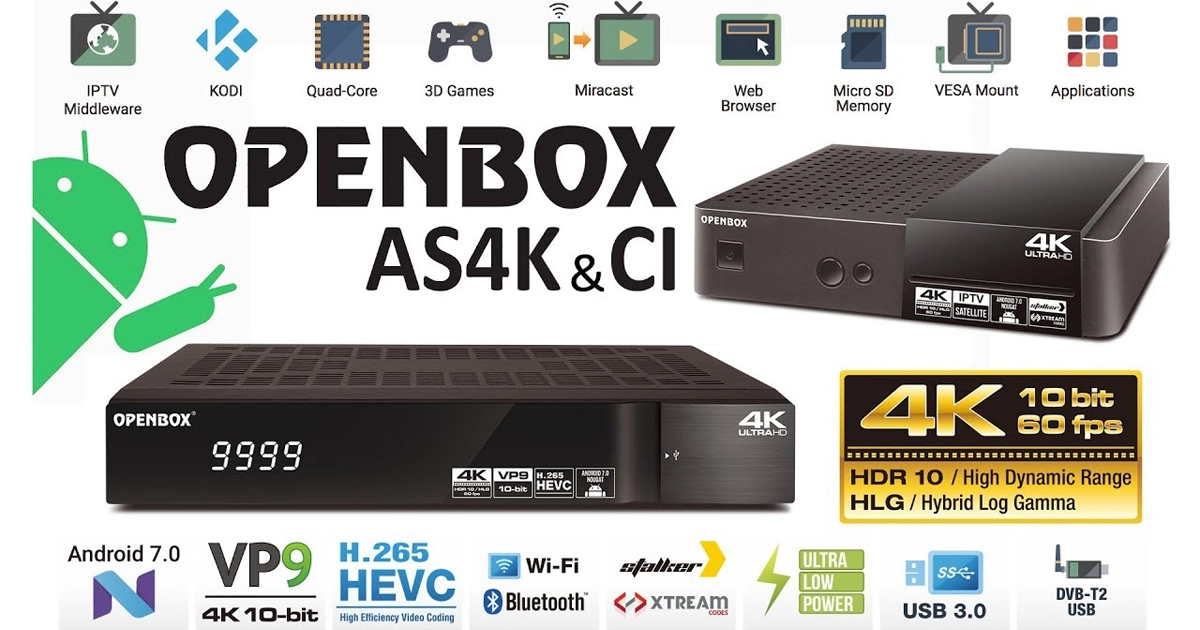
Features of Openbox AS4K, AS4K CI, and AS4K CI Pro+ with Android OS
- Features of Openbox AS4K , AS4K CI and AS4K CI Pro+ with Android OS
- Satellite TV menu and reception
- “Manager” section and program installation
- KODI – multimedia entertainment center
- Internet TV ( OTT ) and Video on Demand ( VoD ) services
- Games and game controllers ( GamePad )
- Reception of terrestrial DVB-T2 channels
- View IPTV
- MyTVOnline application
- FreeTV Pro app
- Web surfing and YouTube
- Special features of Openbox AS4K+ , AS4K CI and AS4K CI Pro+
- Power consumption of set-top boxes
4K (UHD) is a very significant milestone in the development of television broadcasting. In addition to almost four times the screen resolution, the standard carries a number of additional options to improve quality:
- Image resolution 3840 x 2160 pixels (compared to an 8 Megapixel photo)
- Increased frame rate to 50 or 60 Hz – for smooth dynamic scenes
- High color depth – 10 Bit will provide better color reproduction
- HDR/HLG – high dynamic range for a more realistic image
The Hi3798Mv200 processor from Hisilicon was chosen for Openbox 4K (UHD) set-top boxes. In turn, Hisilicon is a subsidiary of the largest telecommunications giant Huawei.
A modern TV set-top box is unthinkable without an operating system (OS) that extends its functionality. The de facto current OS is Android.
Openbox hybrid set-top boxes with Android OS are well-deservedly popular on the market and have managed to be updated to the second generation: Openbox AS1 and Openbox AS2.
Very often, a new but raw product is released to the market, its refinement can take a long time and may never be completed. A large number of new interface elements usually do not find approval from the user.
The hot new products Openbox AS4K , AS4K CI and AS4K CI Pro+ were not created “from scratch”. They have support for all revolutionary standards, excellent performance, and also carry the experience of the previous models Openbox AS1 and Openbox AS2.
What does this give the buyer? – he gets a modern console with a familiar and refined interface, practically no “glitches”, comfort and pleasure in its operation.
Buyers are offered several 4K (UHD) set-top boxes at once: Openbox AS4K+, Openbox AS4K CI and Openbox AS4K CI Pro+. The models also have different housings and equipment.
Openbox AS4K+ can be called more “budgetary”, but this did not affect the quality of the resulting image and sound.
Features of Openbox AS4K series set-top boxes:
- Operating system Android 7.0 Nougat
- Modern and powerful Hisilicon Hi3798Mv200 processor from Huawei
- The satellite TV reception interface repeats the Openbox SX, AS1, AS2 series set-top boxes
- HDMI 2.0 output with resolution up to 3840x2160p (4K Ultra HD) 60fps
- High Dynamic Range (HDR) 10bit and Hybrid Log Gamma (HLG) compatibility
- New video compression format H.265 (HEVC)
- Built-in RAM 2Gb (AS4K CI Pro)
- Optimized software for comfortable operation with 1GB DDR4 RAM
- Ability to simultaneously record three channels, as well as an entire TS transponder
- Unsurpassed image quality and good DVB-S/S2 signal sensitivity
- Built-in Wi-Fi module (external in AS4K CI model)
- MicroSD slot for memory cards
- Over a million apps on Google Play Market
- Connecting Bluetooth keyboards, mice and headphones (with external adapter)
- Work with Excel , Word , email, Skype and more
- Thousands of different games with support for game controllers (FlyMouse , Game Pad)
- Fast and stable operation of the Kodi (XBMC) entertainment center
- Unlimited VoD and OTT services
- Full reception of DVB-T/T2 terrestrial TV broadcasts (adapter required)
- Remote control (AS4K CI and AS4K CI Pro+ only)
Differences between Openbox AS4K, AS4K CI and AS4K CI Pro set-top boxes:
| Openbox AS4K | Openbox AS4K CI | Openbox AS4K CI Pro | |
| Corps | plastic 155x35x135mm | metal 220x35x145mm | metal 220x35x145mm |
| CI slot for access modules | No | Yes | Yes |
| Mounting behind the TV | provided | included | included |
| External IR receiver | provided | included | included |
| USB ports | 1 x USB 2.0 , 1 x USB 3.0 | 2 x USB 2.0 , 1 x USB 3.0 | 2 x USB 2.0 , 1 x USB 3.0 |
| Remote control | usual | studying | studying |
| Front panel indicator | two-color LED | 7-segment | 7-segment |
| Connecting to Wi-Fi | built-in module | USB adapter included | USB adapter included |
| Memory (RAM + Flash) | 1Gb + 8Gb | 1Gb + 8Gb | 2Gb + 16Gb |
At the end of 2018, the series was supplemented by the Openbox AS4K+ set-top box , it differs from the Openbox AS4K only in the newer DVB-S2 input tuner . But this tuner allows you to receive channels in the Multistream broadcast format.
At the end of 2019, a new product, Openbox AS4K CI Pro+, was released. It differs from the Openbox AS4K CI Pro only by a newer DVB-S2 input tuner with Multistream support.
The devices come with everything necessary for quick setup and comfortable operation. The higher-end model, Openbox AS4K CI, features a mount for the back of the TV and an external IR receiver.
Due to the metal casing used in the Openbox AS4K CI, integrating an internal Wi-Fi module is not possible. Therefore, an external USB Wi-Fi adapter is included in the box with the set-top box directly from the factory.
All models come with a brief manual designed to assist with setup and resolving the most common issues. The Android operating system and the set-top box interface are intuitive, so the days of thick booklets detailing every function are gone.
The set-top boxes come with a high-quality HDMI cable. It is recommended to use this cable for connecting to the TV, as lower-quality cables may cause issues such as signal loss or image dropouts.
Connection via analog signal (RCA cables) is now rarely used, so a MiniJack-3xRCA cable is no longer included in the box from the factory. However, if such a connection is needed, a cable from previous models (Openbox S4, SX4, AS2, F3/F4) will work.
The power supplies are also identical, providing 12V with a permissible current of 2A. This is a reliable adapter from Shenzhen Ruiyu Technology, capable of powering the set-top box throughout its entire service life without issues.
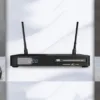
The Openbox AS4K CI is housed in a metal case 220mm wide. Essentially, it uses the proven form factor of market favorites such as the AS2 and SX4. The set-top box will look great next to the TV and can easily be hidden behind it, even if the TV is wall-mounted.
The 7-segment digital display has a pleasant white glow, and its brightness can be adjusted through the set-top box menu. It is also worth noting that the displayed information can be configured when the box is on: either the channel number or the current time.
Additionally, on the right side, there is a two-color LED indicator for standby mode and IR command reception from the remote control.
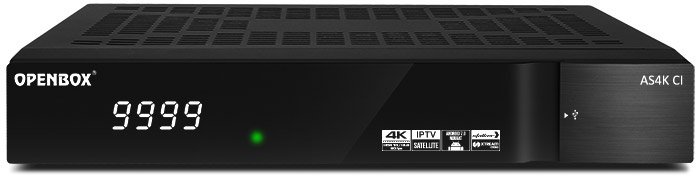
The front panel of the Openbox AS4K CI has a slightly different shape compared to its predecessors. On the right side, there is a small cover hiding the third USB port.
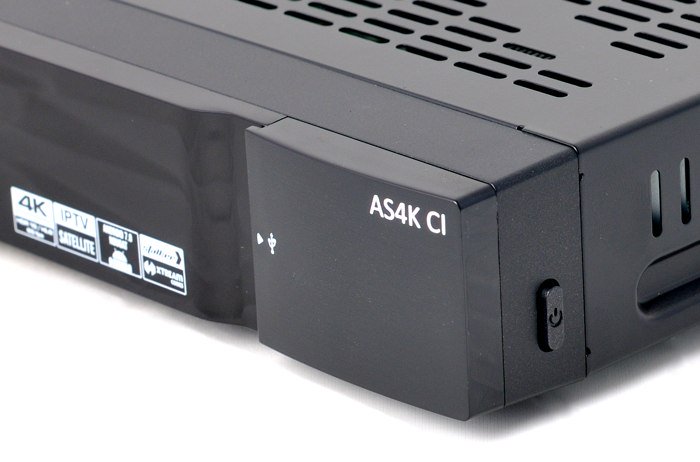
Just to note, the power button is located on the right side of the front panel.
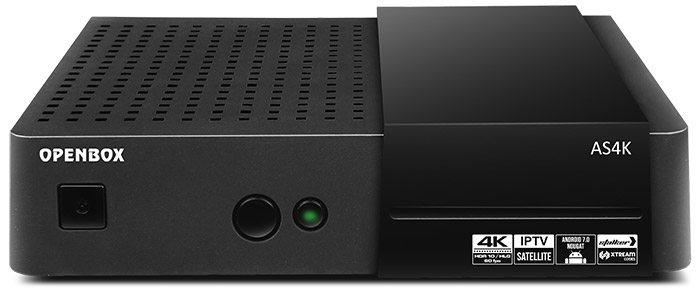
The smaller sibling, Openbox AS4K, measures only 155mm in width. In the center, the IR receiver and LED indicator for operating modes stand out. On the right side, there is a small glossy plastic insert housing the smart card slot.
The rear panel of the Openbox AS4K CI is identical to that of the Openbox AS2, while the top cover is densely perforated with ventilation holes, which are especially useful in the summer.
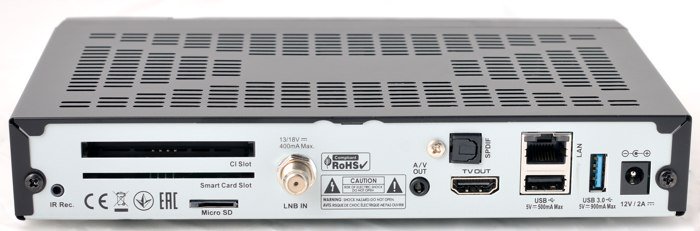
Connection for an external IR receiver for the remote control IR Receiver
- CI Slot – slot for installing CAM modules
- Smart Card Slot – slot for smart cards
- MicroSD slot – for expanding built-in memory
- Antenna signal input: LNB In
- Analog audio and video outputs: A/V OUT
- Optical digital audio output: SPDIF
- Of course, digital HDMI 2.0 output
- Ethernet port combined with a USB 2.0 port
- High-speed USB 3.0 port marked with a blue insert
- Power connector: 12V 2A
The smaller model retains all rear connectors compared to its bigger sibling. The only exceptions are the CI slot for access modules, while the smart card slot, as we mentioned, has been moved to the front panel.
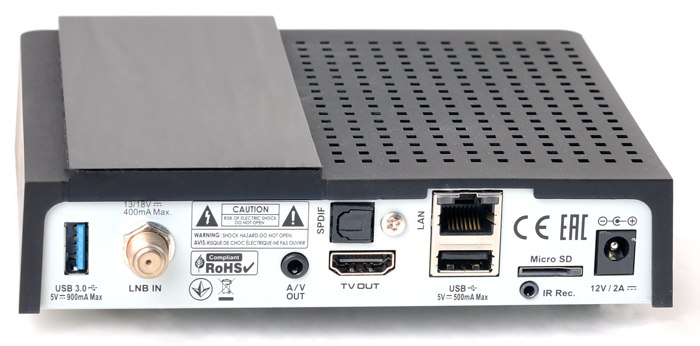
It should be noted that the MicroSD card for memory expansion is inserted with the contacts facing up in the Openbox AS4K CI. In the smaller model, the card is inserted with the contacts facing down.
Both models have special protrusions on the bottom for mounting on a bracket behind the TV.
However, the bracket, screws, and external IR receiver for the remote are included only with the fully metal Openbox AS4K CI.
The bracket is attached to the back of the TV using screws or directly to the wall. Then the set-top box easily fits into the bracket’s protrusions and can be easily removed if needed.
The small IR receiver should be placed on the top or bottom of the TV so it can “see” the remote control commands. This provides an elegant and practical solution to hide both the set-top box and all cables behind the TV.
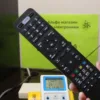
The Openbox AS4K CI remote control may seem similar to previous models.
The main difference lies in the top section: the STB button is now transparent with a red backlight, and TV control buttons (power and input selection) have been added on the sides.
To pair the Openbox AS4K CI remote with a TV, follow these steps:
- Press and hold the SOURCE button on the Openbox AS4K CI remote until the red light stops blinking (about 5 seconds).
- A steady red light indicates that the remote is in learning mode.
- Press the button on the Openbox AS4K CI remote that you want to program (TV or SOURCE).
- The red light starts blinking slowly (the remote is ready to receive learning commands).
- Point the TV remote at the Openbox AS4K CI remote and press the corresponding button (POWER or SOURCE).
- Three quick blinks indicate that the button has been successfully learned.
* Please note that only the Openbox AS4K CI remote can be programmed; the Openbox AS4K remote cannot.
Another, less significant change is the rearrangement of some buttons. For convenience, all buttons related to PVR have been moved to the lower section of the remote in a separate block.
The smaller model comes with a new remote in terms of design, shape, and button size, while maintaining the refined ergonomics of Openbox products.
The basic layout principle remains: numeric buttons at the top, frequently used buttons in the center, and functional and PVR buttons at the bottom.
The lower section has two indentations so the remote can rest on the index finger, preventing it from slipping out of the hand.
Both remotes are powered in the standard way with two AAA batteries.
For those who like to “look under the hood,” there is no need to disassemble the device — we proudly showcase the internal components of the new Openbox 4K set-top boxes.
The mainboard of the higher-end model, Openbox AS4K CI, occupies the entire case. This is not surprising — the CI interface for CAM modules, as well as its CIMaX+ SMARDTV controller, have very wide connection buses.
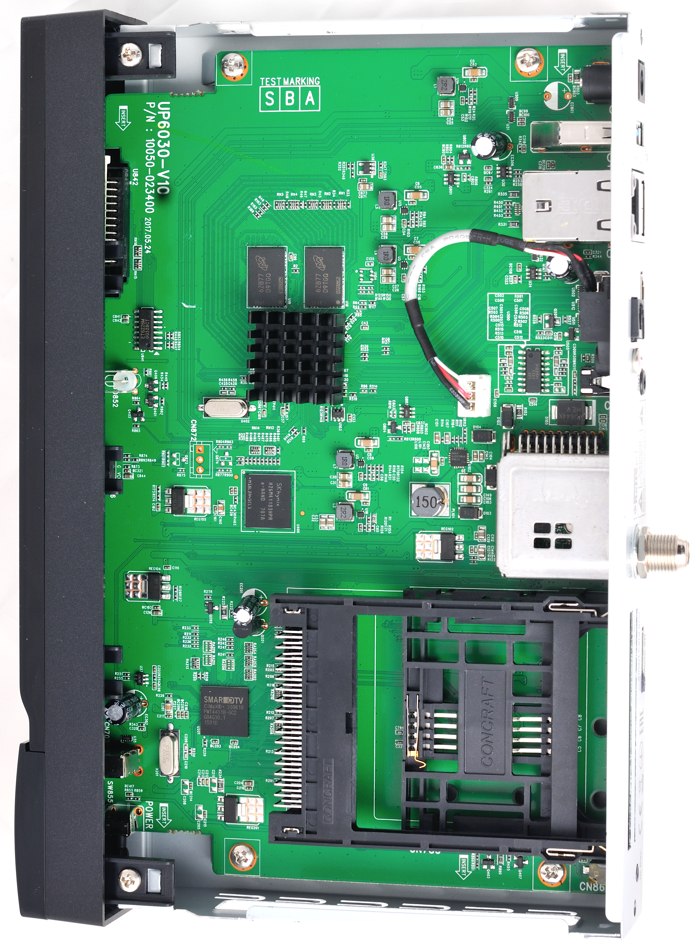
An experienced engineer, looking at the boards, would immediately notice that nothing was “cut corners” on (stabilizers and filters for isolating power to various modules). Both devices are designed and manufactured according to the highest standards of modern electronics.
The same can be said about the component suppliers: flash memory comes from the Korean company SK Hynix Inc, while the RAM is from the American company Micron Technology.
The smaller Openbox AS4K features a built-in antenna and a Wi-Fi 802.11bgn module based on the RTL8188ETV chip from the well-known Taiwanese company Realtek Semiconductor Corp.
The most important component on the boards of both set-top boxes is covered by a large black heatsink to dissipate excess heat — this is the Hi3798Mv200 processor from Hisilicon.
It features a high-performance Quad-core 64-bit ARM Cortex A53 architecture, an integrated NEON multimedia accelerator, a hardware Java accelerator, and support for the following standards:
- H.265/HEVC Main/Main 10 profile @ level 5.1 high-tier
- 4K x 2K @ 60 fps 10-bit
- High Dynamic Range 10 (HDR10) / Hybrid Log-Gamma (HLG)
- HDMI 2.0 TX with HDCP 2.2 up to 4K @ 60 Hz
The performance of the Hi3798Mv200 is more than sufficient for playing large video files such as BD Rips, smooth operation of “heavy” applications like Kodi (XBMC), as well as various games and multimedia tasks.
Another important point: unlike similar solutions, this processor was specifically developed for use in IPTV/OTT and hybrid DVB set-top boxes. Coupled with high-quality software, it becomes clear why the stability and convenience of PVR functions (Recording, Playback, Time-Shift) far surpass the competition.
In other words: if the best chef works with excellent ingredients, the result will be a superb soup.
We need to return to the higher-end Openbox AS4K CI, which comes in the box with a high-quality wireless USB Wi-Fi adapter based on the Realtek RTL8188ETV chip.
This was necessary due to the limited list of Wi-Fi chips supported by the Hi3798Mv200 processor:
Wi-Fi modules:
RTL8188EUS
RTL8188ETV
RTL8812AU
HI1131C
MT7601U
Wi-Fi + Bluetooth modules:
RTL8723BU
RTL8822BU
MT7632U
MT7662U
QCA6174
If you need to connect to a wireless Wi-Fi network, simply insert the adapter into an available USB port and configure it through the set-top box menu.
The adapter has a detachable antenna, so it is easy to install an antenna with a higher gain.
The main menu consists of several sections. For example: IPTV – for applications of the corresponding services, Programs – all installed Android OS apps, Manager – utilities for managing the set-top box.
There is even a weather forecast service, which suggests it is frequently used.
In the “Settings” section of the main menu, you can scan satellite channels and set other parameters.
Simplicity and style are words that perfectly describe the set-top box interface.
At the same time, a large number of options are available for detailed customization. For example, any connected storage device can be selected as a recording device, and the automatic Time-Shift mode can be activated.
Pressing the OK button brings up the classic and familiar list of available channels. In the favorites list, a built-in 4K (UHD) group has appeared, where channels of the corresponding quality are automatically added.
A simplified list can be displayed by pressing the Up/Down buttons. On the left side of the list, brief information about the current program is now shown.
The info panel maintains a balance between the amount of information displayed and ease of perception.
Pressing the INFO button again displays a detailed TV Guide of the program and broadcast parameters.
The Openbox AS4K allows simultaneous recording of three channels and Time-Shift on one of them.
The timeline is also elegantly integrated into the interface, and its automatic scaling mode is extremely convenient for “jump” rewinds.
A PIP (Picture-in-Picture) function is available when two channels are received simultaneously.
There is also an extended mode called PAP.
The Manager menu section contains utilities necessary for maintaining the set-top box.
Here you can view the current software version, install new updates, save or restore settings, including the channel list, and much more.
There is little point in describing the app store and other content – almost everything is available there.
Android applications (APK) can also be installed from a USB drive or hard disk.
The KODI multimedia center (formerly XBMC) is a program with an excellent interface and capabilities for conveniently watching movies, viewing photos, listening to music, and, with various add-ons, accessing IPTV, OTT, VoD, and other services.
KODI is installed like any regular Android app, by first downloading the APK from www.KODI.tv.
KODI requires substantial resources for smooth operation, but the Hisilicon Hi3798Mv200 processor handles all these tasks easily and smoothly.
There are proprietary features such as remembering the last playback position, chapter-based skipping like on DVD or BD discs, downloading movie covers, and much more.
Different Internet TV (OTT) and Video-on-Demand (VoD) services are available in different countries. To use any of them on Openbox AS4K and AS4K CI, simply install the corresponding Android OS application.
- MEGOGO – TV, Movies, Audiobooks (Play Market)
- Kyivstar TV (Play Market)
- OLL.tv (Play Market)
- Divan.TV (Play Market)
- 1+1 video – TV and series (Play Market)
- youtv – online TV, 150+ free channels (Play Market)
- TV.UA Television of Ukraine (Play Market)
- OmegaTV (Play Market)
- Hulu for Android TV (Play Market)
- Amazon Prime Video (Play Market)
- HBO Max: Stream TV & Movies (Play Market)
- Vimeo (Play Market)
- YouTube (Play Market)
- Netflix (Play Market)
- ViP Play: movies, series, and online TV (Play Market)
- Volia TV for Android TV (TVs and set-top boxes) (Play Market)
- TikTok (Play Market)
- Apple TV (Play Market)
- Google Play Movies & TV (Play Market)
- SWEET.TV for TV – 260+ channels and movie hits (Play Market)
- Lanet.TV – online TV of Ukraine, channels in HD (Play Market)
- Nashe Kino – movies (Play Market)
- KinoPoisk (Play Market)
- IMDb Movies & TV (Play Market)
- Vodafone TV (Play Market)
- Trinity TV (Play Market)
- FainoTV – online TV (Play Market)



3 comments
Ruta Vaghasiya
It is a long established fact that a reader will be distracted by the readable content of page when looking at its layout. The point of using is that it has a more-or-less normal distribution of letters, as opposed to using ‘Content here, content here’, makings look like readablei English.
rosetyler
@Ruta Vaghasiya The standard chunk of Lorem Ipsum used since the 1500s is reproduced the below for those interested. Sections 1.10.32 and 1.10.33 from “de Finibus Bonorum”.
Ruta Vaghasiya
It has survived not only five centuries, but also the leap into electronic typesetting, remaining more essentially unchanged. It was popularised in the 1960s with the release of Letraset sheets containing Lorem Ipsum passages, and more recently with desktop publishing.