
Review of the Dune HD Max 8K
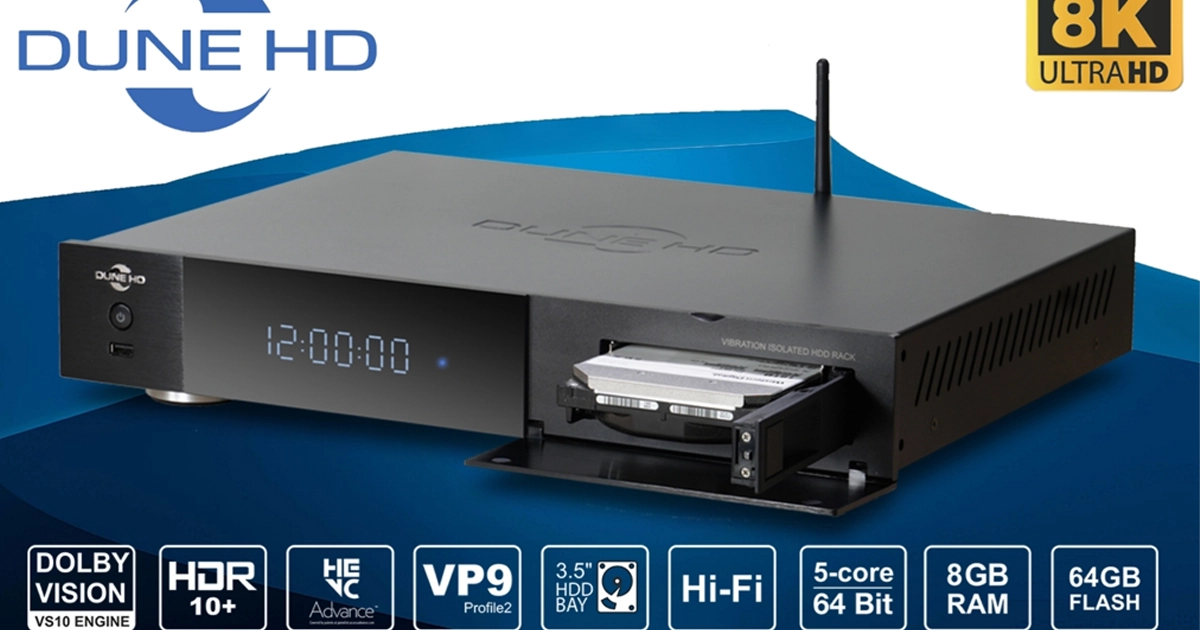
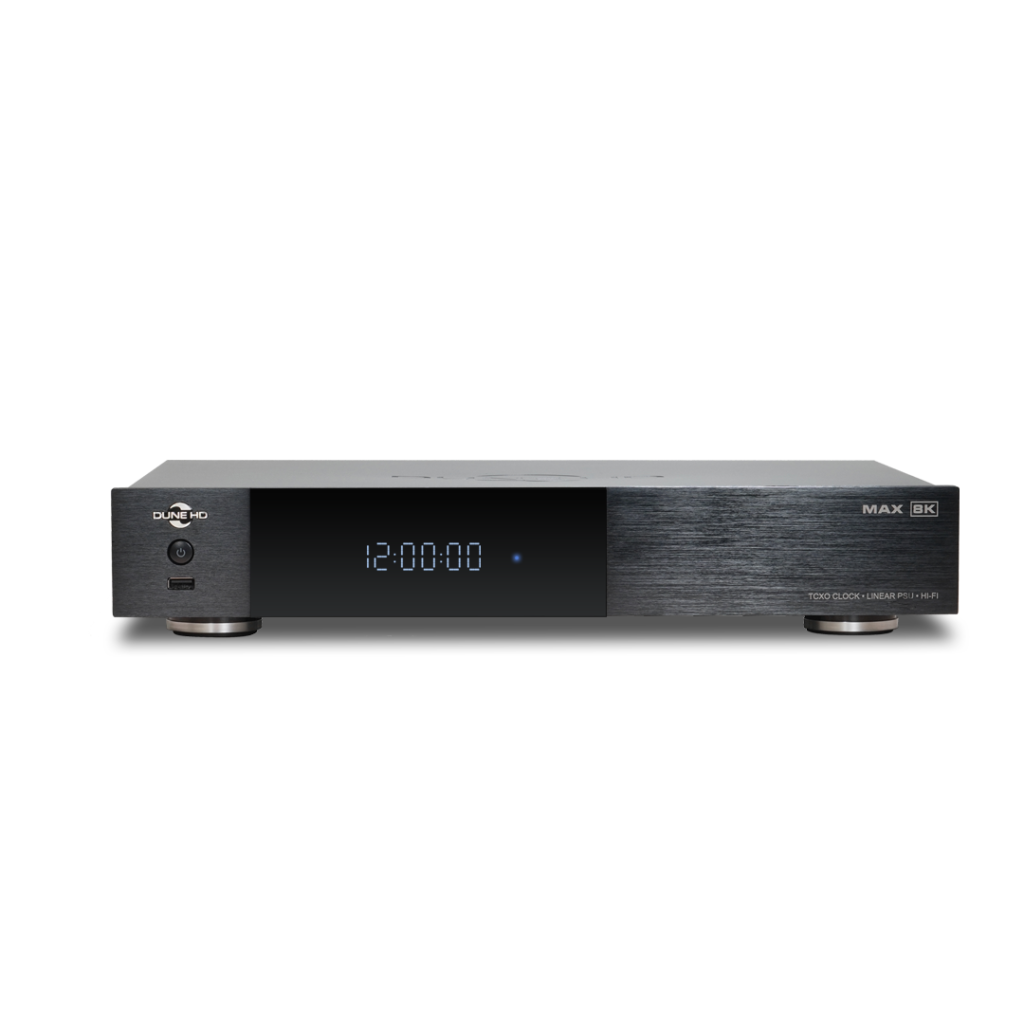
Dune HD Max 8K is a premium media player from a well-known manufacturer. It runs on the Android 11 operating system and is equipped with the Amlogic S928X-K/J processor, which supports Dolby Vision and HDR10+ technologies.
In addition to the maximum memory capacity (8 GB RAM and 64 GB internal storage), the player supports the AV1 codec and has a 1000 Mbps LAN port, as well as Wi-Fi 6 support.
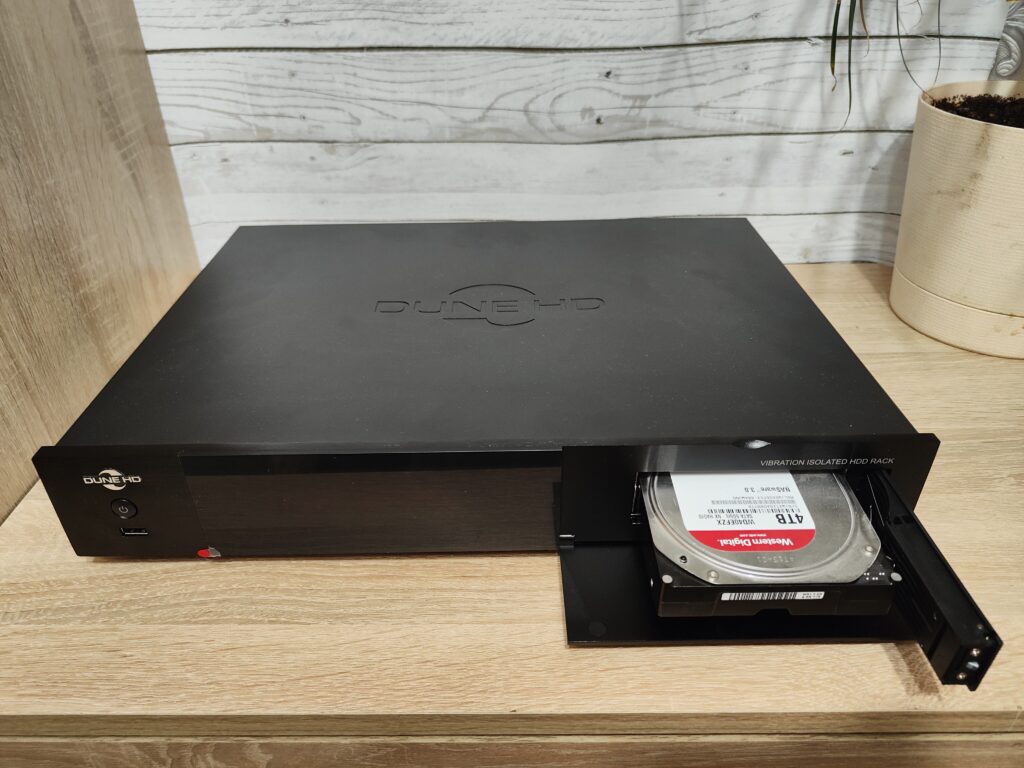
The player’s case is full-sized and features a 3.5″ HDD bay on a vibration-isolated chassis.
A distinctive feature of this player is its Hi-Fi components: a linear power supply and a TCXO clock generator provide maximum signal quality on all outputs. There is also a Hi-Fi digital audio output based on the XMOS chip.

The year 2024 ended powerfully for Dune HD: after releasing the Pro Vision 4K, two new players were launched simultaneously: Pro 8K Plus and Max 8K.
Pro 8K Plus is the base model in the 8K player lineup. It features passive cooling and lacks a 2.5″ hard drive bay. We will discuss it another time. For now, I recommend checking out the Pro One 8K Plus review, as these models are quite similar.
Today, as you probably understood from the title of this review, we will focus on the flagship model: Max 8K, which, in my opinion, is the most interesting. At the very least, it is the first full-size media player from the company in several years. Essentially, by the end of the year, Dune made a gift to its most demanding audience by offering the very best available at the moment.
Historically, the Max lineup has always been quite important for the manufacturer. It has always been something special: throughout the company’s history, there haven’t been many such models, but each was unique in its own way. I have a “special” relationship with this lineup. My acquaintance with the Dune HD brand began in the 2010s, and interestingly enough, it started with a Max (coincidence?), although not 8K or even 4K! At that time, I was just a student, and Max HD was purchased by my father. The player was impressive in almost every aspect: it played all video formats, and music worked flawlessly. Watching IPTV, which was just gaining popularity at the time, was quite comfortable. Naturally, the Blu-ray drive attracted attention, though I admit we mostly watched DVDs (movies and concerts), as those discs were widely available, while Blu-ray discs were just emerging and quite expensive. Before Dune, we had a regular DVD player. That’s also when I first encountered the hard drive bay mechanism. It reminded me of a VCR, only instead of cassettes, HDDs could be used. I even imagined a shelf lined with numbered hard drives… In the end, we only used two: considering the material quality, large capacities weren’t necessary at the time. Nevertheless, it all seemed extremely interesting back then.
I could never have imagined that over ten years later I would be reviewing the new Max 8K! But it had to happen. After gaining experience with other media players, I returned to Dune. At that time, it was the Pro Vision 4K Solo on Realtek 1619DR. The player impressed me so much that I purchased the Max Vision 4K, and I was fortunate to get a unit from the first batch, still with the AK4493 DAC, which was later replaced by the ES9038Q2M due to circumstances. This was the second Max in my life and the third in the company’s history: a few years earlier, they had released the Max 4K on Realtek 1295. All three Max models offered different concepts. The Max HD emphasized the disk bay, Blu-ray drive, and expanded connectivity—more wasn’t needed at the time. Max 4K focused on digital audio output and was a milestone for the company: it was the first full-size Dune on Android! The company clearly demonstrated that “rumors of its demise were greatly exaggerated.” Max Vision 4K, in addition to supporting Dolby Vision (the first full-size player from the company to do so), offered high-quality analog audio, entirely through its own means thanks to the built-in top-tier DAC. I simply connected it to the analog input of my AV receiver and enjoyed quality sound (as much as possible using a multi-channel receiver). Now it’s time to get acquainted with the new Max 8K, which I am genuinely excited about!
So, at the end of November, Dune HD Max 8K finally arrived in Russia and went on sale for 89,990 rubles. As I mentioned earlier, with this model, the manufacturer sums up a very successful 2024 and offers the absolute best of what it has today—a kind of maximum.
Related Products
Contents
- Technical Specifications
- Package Contents
- Appearance and Port Layout
- Internal Components
- Network Modules
- Video Playback
- Audio Output
- Audio Output Options
- HiFi Coaxial
- HiFi Coaxial + External DAC (AK4493)
- USB-Audio (Audio Output via USB to External DAC)
- Conclusions
Technical Specifications — Dune HD Max 8K
| Parameter | Specification |
|---|---|
| Processor (SoC) | Amlogic S928X-K/J |
| CPU | ARM Cortex A55 2.0GHz 4-core + ARM Cortex A76 1.9GHz |
| GPU | Mali G57 |
| Operating System | Linux-based Dune HD OS + Android 11 |
| RAM | 8GB |
| Internal Storage (Flash) | 64GB |
| OpenGL | OpenGL ES 3.2 |
| Ethernet | 1 Gbit |
| Wi-Fi | 802.11/b/g/n/ac/ax (Wi-Fi 6) Dual Band 2.4GHz + 5GHz, 2T2R |
| Bluetooth | 5.2 |
| USB Ports | 3x USB 3.0, 1x USB 2.0 |
| SATA HDD Slot | 3.5″ HDD, 20 TB+, hot swap |
| HDMI Output | HDMI 2.1a (up to 8Kp60, experimental 4Kp120) |
| Optical Audio (S/PDIF) | Yes |
| Coaxial Audio (S/PDIF) | Yes |
| Analog Audio Output | 2x RCA |
| Front Panel Display | Multi-segment LED display HH:MM:SS |
| Remote Control | Bluetooth remote with AirMouse, microphone, IR learning, backlight |
| Antennas | Two external removable Wi-Fi + one non-removable Bluetooth |
| Smartphone Control (iOS, Android) | Yes, Dune Control app |
| Hi-Fi Digital Audio Outputs (XMOS) | Yes (S/PDIF, I2S-E) |
| Power Adapter | Built-in |
| Linear Power Supply with Toroidal Transformer | Yes |
| Magnetic Shield for Toroidal Transformer | Yes |
| TCXO Chip (Precision Clock Generator) | Yes |
| Dedicated USB DAC Port with Noise Filtering | Yes |
| Vibration-Isolated HDD Chassis | Yes |
| Separate Ground Connector | Yes |
| Supported Audio Formats | MP3, MPA, M4A, AAC, WAV, FLAC, Ogg/Vorbis, WavPack, APE, ALAC, SACD ISO (stereo/multichannel), SACD DSF (stereo/multichannel), SACD DFF (stereo/multichannel), AC3, DTS, DTS-WAV |
| Bitstream Passthrough | All Dolby/DTS formats (up to Dolby TrueHD Atmos and DTS X) |
| Dolby/DTS Decoding | Multichannel (up to 7.1 channels) of all formats |
| Audio Decoding | MPEG-1/2 I/II/III, AAC, LPCM, FLAC, multichannel FLAC, Vorbis, WavPack, APE, ALAC, SACD DSD (stereo/multichannel, supports multichannel PCM output to HDMI), multichannel PCM up to 7.1, all Dolby/DTS formats |
| PCM Audio Output | Original sample rate (44.1–192 kHz) |
| Supported Video Containers | MKV, MPEG-TS, MPEG-PS, M2TS, VOB, AVI, MOV, MP4, QT, ASF, WMV, ISO, BDMV |
| Built-in Video Codecs | MPEG2, MPEG4, Xvid, WMV9, VC-1, H264, H.265 (HEVC) Hi10p, VP9 profile 2, AV1 |
| HDR Formats | Dolby Vision, HDR10+, HDR10, HLG |
| Dolby Vision VS10 Engine | Yes |
| Dolby Vision Playback | Profiles 5, 7 (MEL & FEL), 8; ISO/folder/MKV/MP4/M2TS; DTDL, STDL, STSL; dual-layer/dual-track playback with metadata handling |
| Dolby Vision Output | LLDV (Low Latency), STD DV (Standard) |
| Frame Rates | All standard, including 23.976, 24, 25, 29.97, 30, 59.94, 60 |
| Blu-Ray Playback | Lite (no menu) + Full (with full menu) |
| DVD Playback | Lite (no menu) + Full (with full menu) |
| 3D Video Support | Side-by-Side, Top-and-Bottom (3D switching via TV button, MVC not supported) |
| Image Formats | JPEG, PNG, BMP |
| Playlist Formats | M3U, PLS, CUE |
| Supported Subtitles | SRT, SUB (MicroDVD), text (MKV), SSA/ASS (MKV, external), VobSub (MP4, MKV, external SUB/IDX), PGS (ISO, TS, MKV) |
| File System Support | FAT16/32, EXT2/3/4, NTFS, exFAT, HFS/HFS+ (read-only), BTRFS |
| Network Protocols | NFS client, SMB client, SMB server |
| VP9 Profile 2 Support | Yes |
| Widevine DRM for VoD Services | Widevine L1 |
| Dimensions | 430 × 79 × 324 mm |
| Gross Weight | 8.5 kg |
Considering that the Max 8K is far from the first model in the 8K lineup — having previously reviewed the Pro One 8K Plus and Solo 8K (and possibly the Pro 8K Plus review ahead) — let’s focus here on what we haven’t encountered before. I’d like to write more about the hardware itself, as well as audio and video output, so the traditional software, interface, and test sections won’t be included here. Therefore, if I don’t mention something, it doesn’t mean it’s missing. Just keep in mind that this is the manufacturer’s top-of-the-line player (obviously, without any reviews needed), and it, at the very least, supports everything the lower-tier models do. For simplicity, let’s consider the Max 8K as a “maxed-out” Solo 8K.
The first thing worth noting in the technical specifications above is the use of a vibration-isolated chassis in the HDD compartment and the inclusion of a linear power supply. Next, we should highlight the newly added Hi-Fi digital outputs based on the XMOS chip, the high-precision clock generator (TCXO chip), and the dedicated gold-plated USB 3.0 port with extra filtering and interference protection.
Package Contents
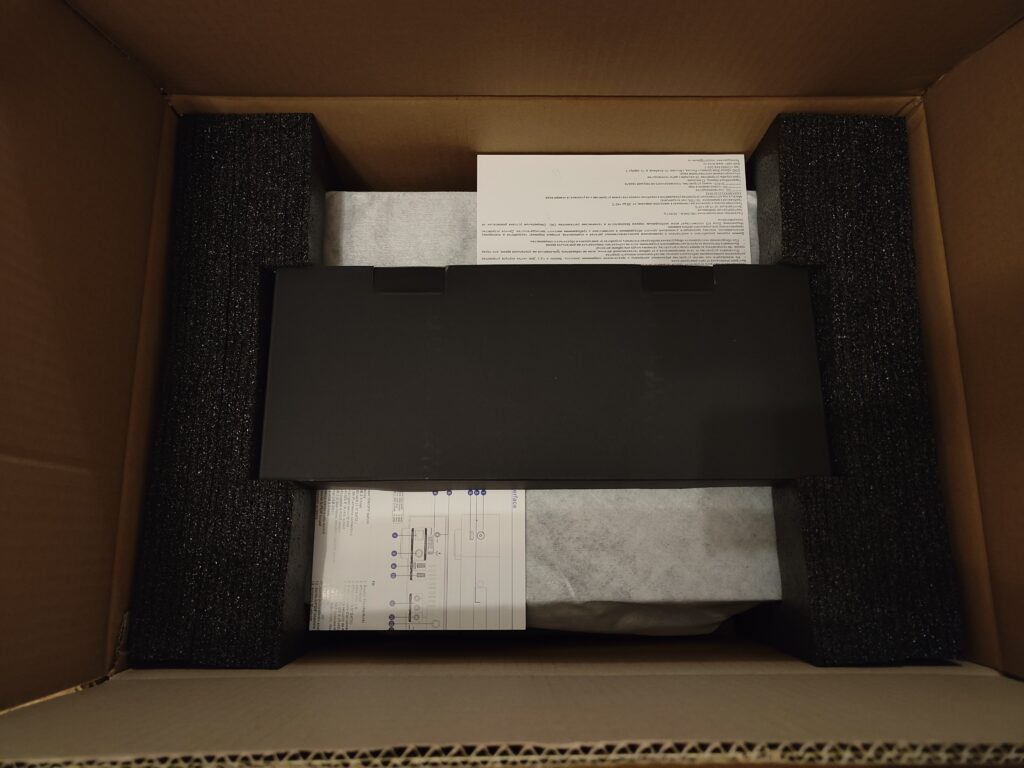
The media player comes in a large cardboard box, or more precisely — in two boxes. Everything is packed thoughtfully. The player is securely fixed with firm foam so that it does not touch the bottom of the box. Overall, the packaging is designed to minimize the risk of damage during transportation, unless one tries to play volleyball or other sports with the box. However, considering its weight, that would be quite challenging.
Included Accessories
All accessories supplied with the media player are packed in a separate black cardboard box. First, we take out this box, and only then the media player itself.
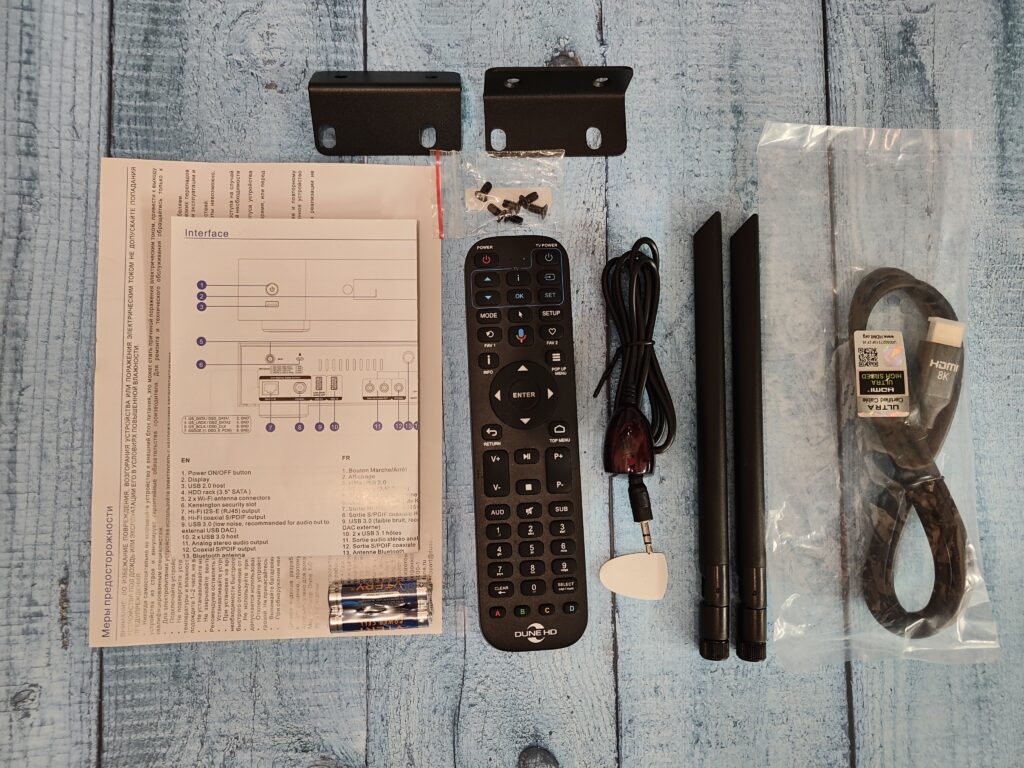
Let’s take a look at what is included:
- Media player
- Bluetooth remote (R4) with Air Mouse and microphone
- 8K HDMI cable
- External IR sensor
- Power network cable
- Wi-Fi antennas — 2 pcs
- Brackets for 19″ rack mounting — 2 pcs
- Set of screws for the brackets
- AAA batteries — 2 pcs
- Quick user guide
Bluetooth Remote
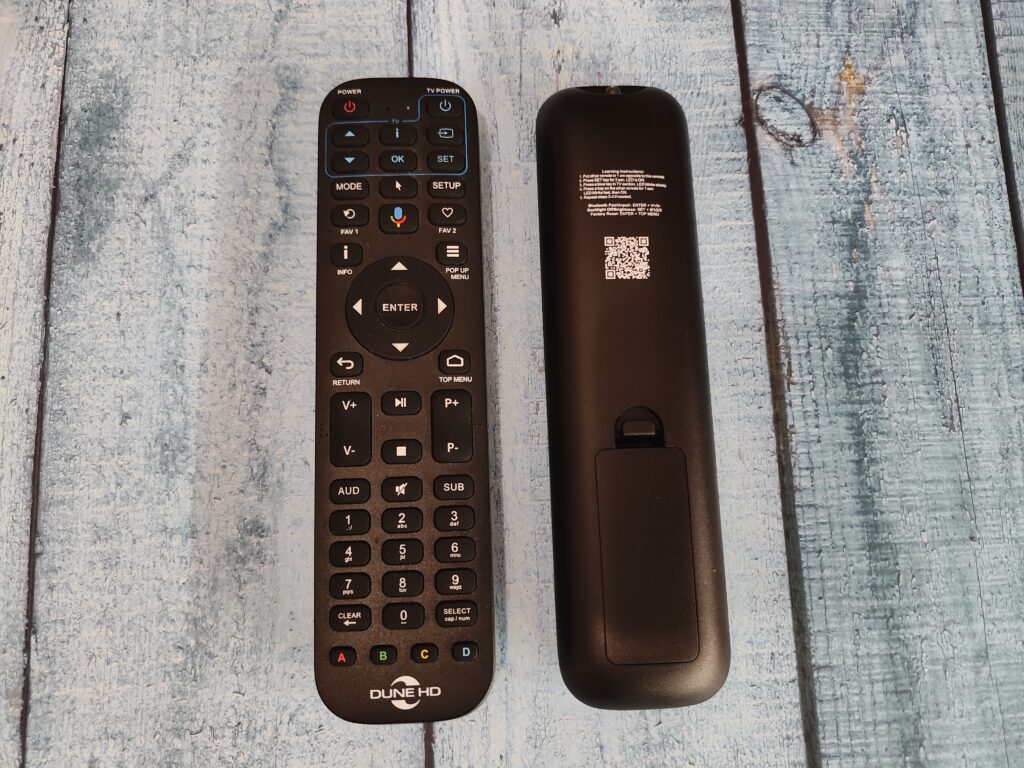
The Max 8K comes with the R4 Bluetooth remote. I have already described it earlier in the Pro Vision 4K review. It is indeed a good and convenient remote, and some of its buttons will be extremely useful, so I do not recommend using third-party remotes.
Unfortunately, there is no separate button to activate the backlight, and there is no motion sensor. Therefore, to turn on the backlight, you need to press any button. The inconvenience is that when you activate the backlight, the button action is also executed. Until you memorize the layout (which is quite easy), while watching a movie, if you need to perform an action, you will have to find a “safe” button — for example, Info, or one of the colored buttons. But this is probably the only drawback of this remote.
Appearance and Port Layout
Now let’s take a look at the media player itself!
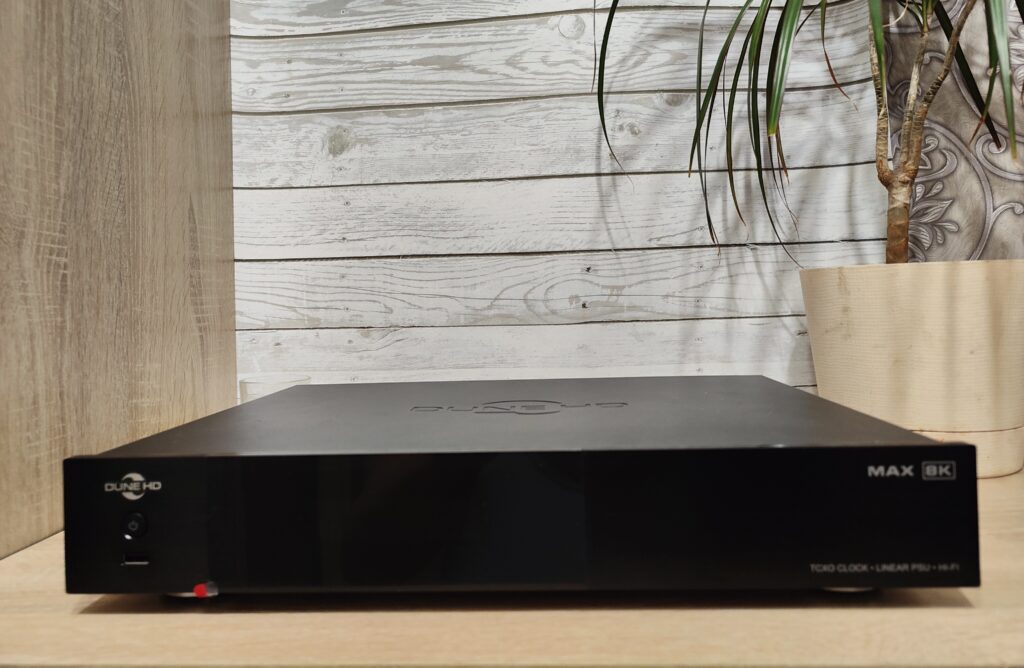
The Max 8K is the company’s first full-sized player in the current lineup. It features a standard 43-cm aluminum alloy case and is quite heavy. Everything is executed neatly and with high quality. On the top cover, we again see the signature Dune HD embossing. In the previous generation, it was “gone,” but now it’s back as in the “good old days.”
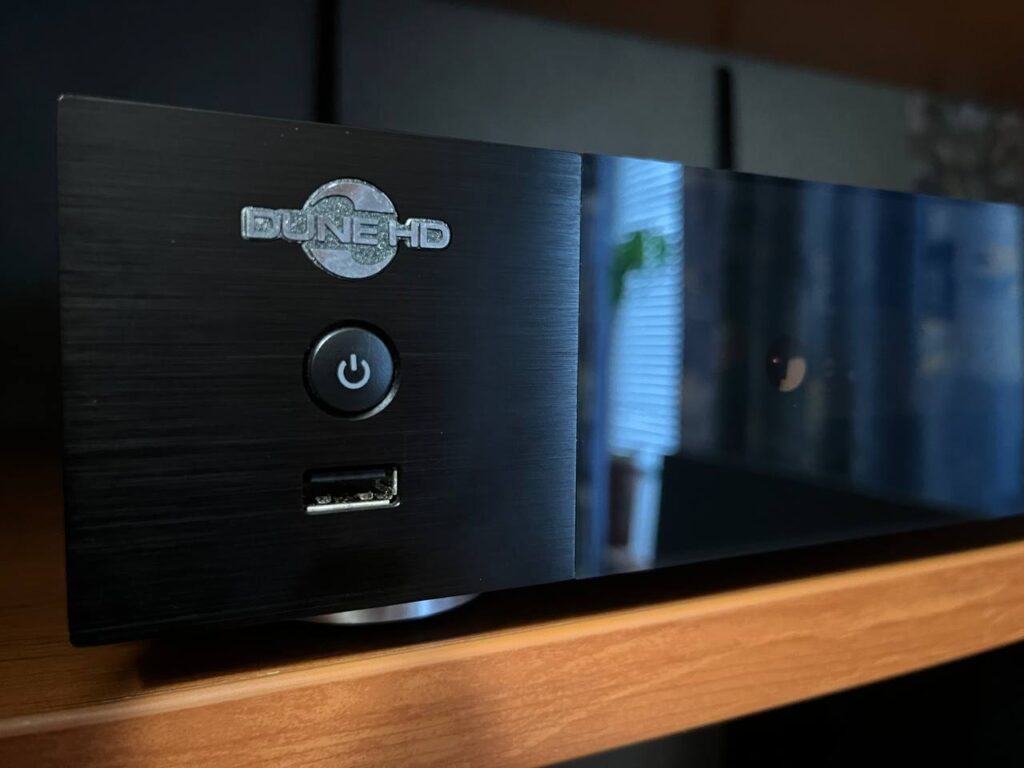
On the front panel, there is a display and a hard drive bay, which this time is neatly covered with a lid. To the left of the screen, there is the company logo, a power button, and a USB 2.0 port. By the way, the logo turned out quite interesting: it is made of metal and is a separate element.
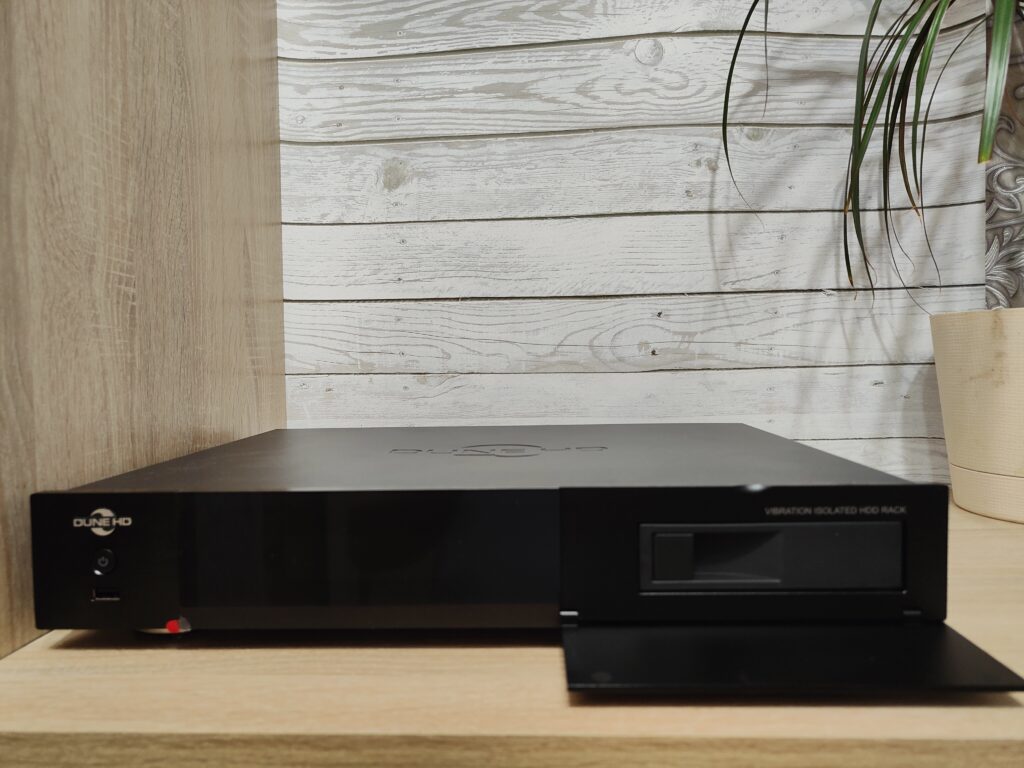
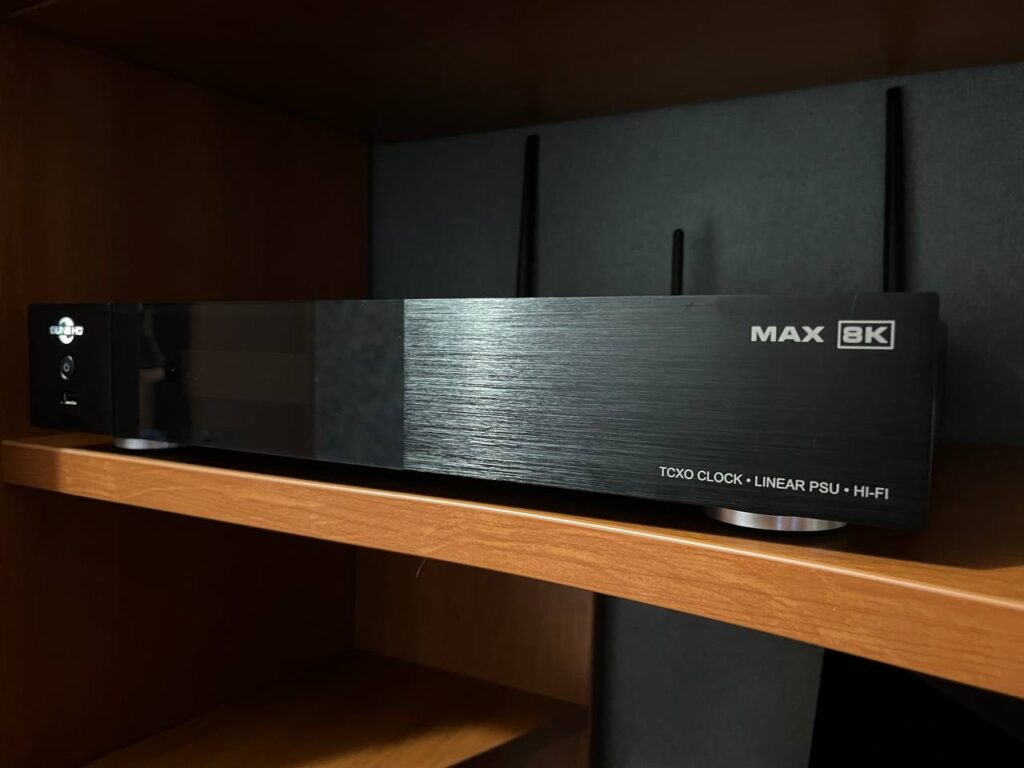
As a rule, in full-size cases, the main connectors are located on the back of the device. The Max 8K is no exception: the side panels only feature ventilation grilles. On the left side, we can also see the branded seal sticker, which traditionally covers a screw. Be careful: if you disassemble the device, you will void the warranty.
As I mentioned above, all the main connectors are located on the back of the device. There is definitely plenty of room to work with here!
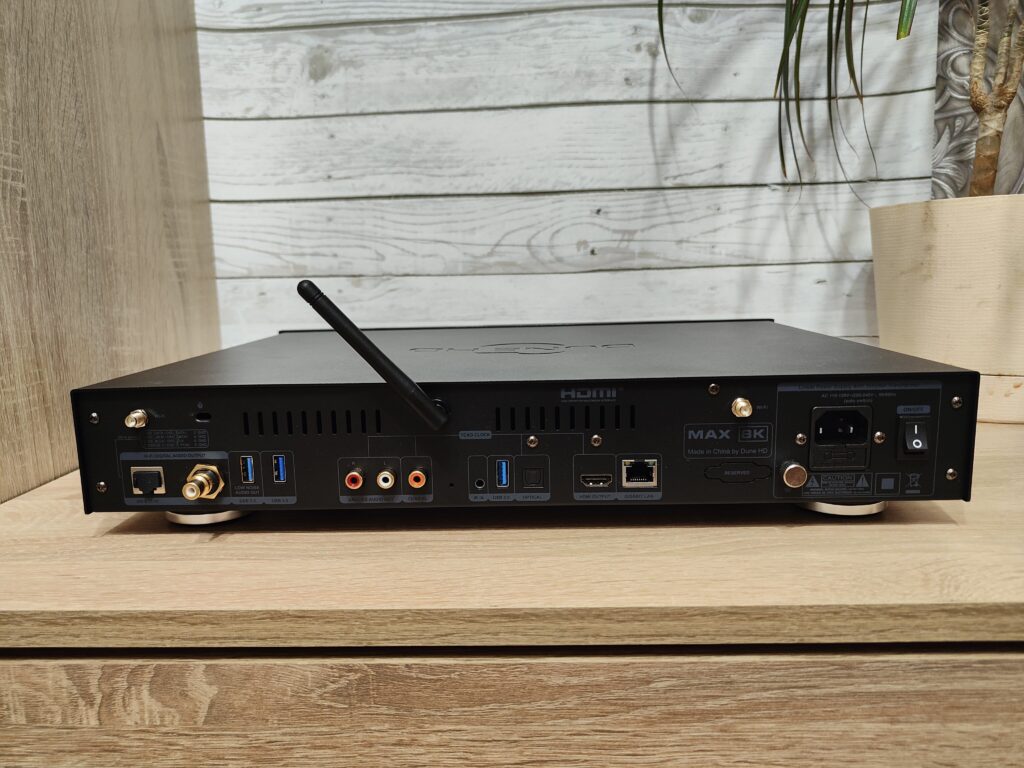
Let’s go through these connectors from right to left, so to speak, from simple to more complex (starting with the power feels more natural):
- Power switch
- Power connector 110-120V/220-240V and fuse (F1A)
- Grounding connector (under a removable cover)
- Connectors for two Wi-Fi antennas
- Gigabit RJ45
- HDMI Out 2.1a
- Optical S/PDIF output
- USB 3.0
- IR IN (for connecting the external IR sensor included in the kit)
- Reset
- Coaxial S/PDIF output
- Analog stereo output (2 RCA)
- USB 3.0
- USB 3.0 with additional noise suppression
- HiFi coaxial S/PDIF output
- HiFi digital output I2S-E (RJ45) (under a rubber cover)
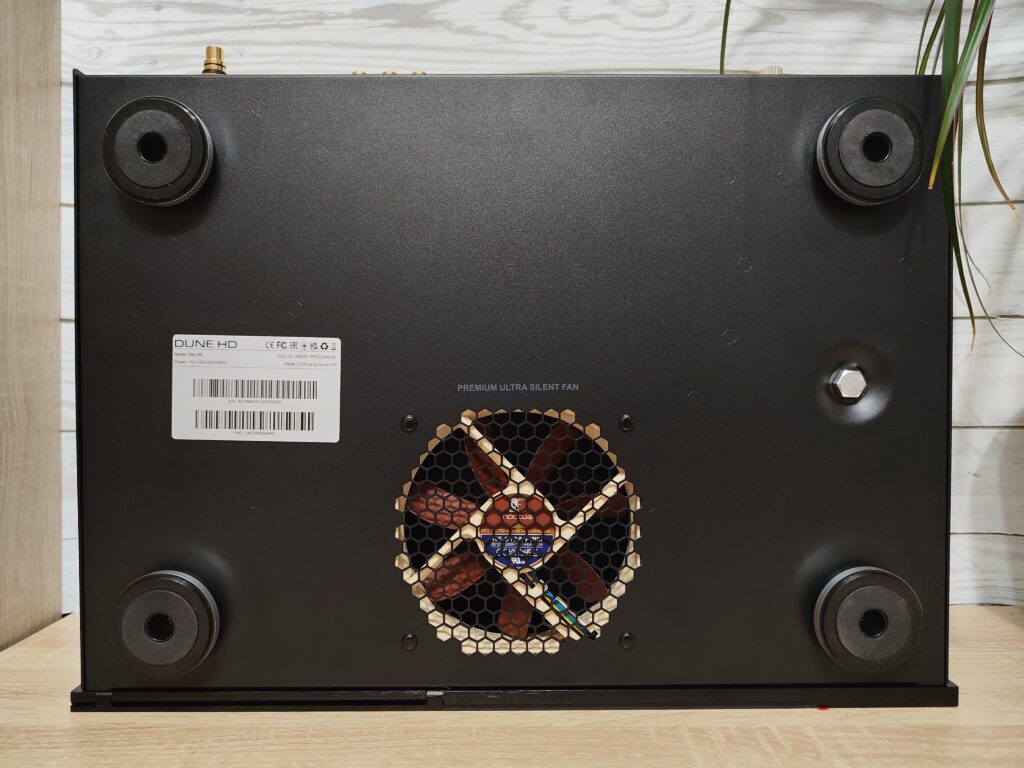
At the bottom of the case, we traditionally have four soft feet and a Noctua: a premium 120mm ultra-quiet fan for effective cooling of the entire hardware. Honestly, it looks really cool. And it works even better! For more than two years, the same fan has been running in my Max Vision 4K, and it is practically inaudible. No wonder—its noise level is only 12 dB!
In terms of cooling, the Max 8K is very well designed. Dune HD engineers took into account that the Amlogic S928 chipset runs hot by itself, and the linear power supply in the device also tends to heat up. That’s why there is only one disk slot, along with the aforementioned Noctua fan!
As much as I love my Max Vision 4K, I have to admit it looks a bit plain in places. The Max 8K, however, has no visual complaints. It’s truly premium: the metal logo, embossing on the top cover, strict lines with subtle inscriptions, and the precise front flap operation. Everything is executed at a high level, and in my opinion, there is nothing to criticize here.
Internal Parts
I know you’re curious about what’s inside the device. But here I have to disappoint you a little. I have no desire to disassemble the device and void the warranty. However, Dune themselves have posted all the necessary images on their website.
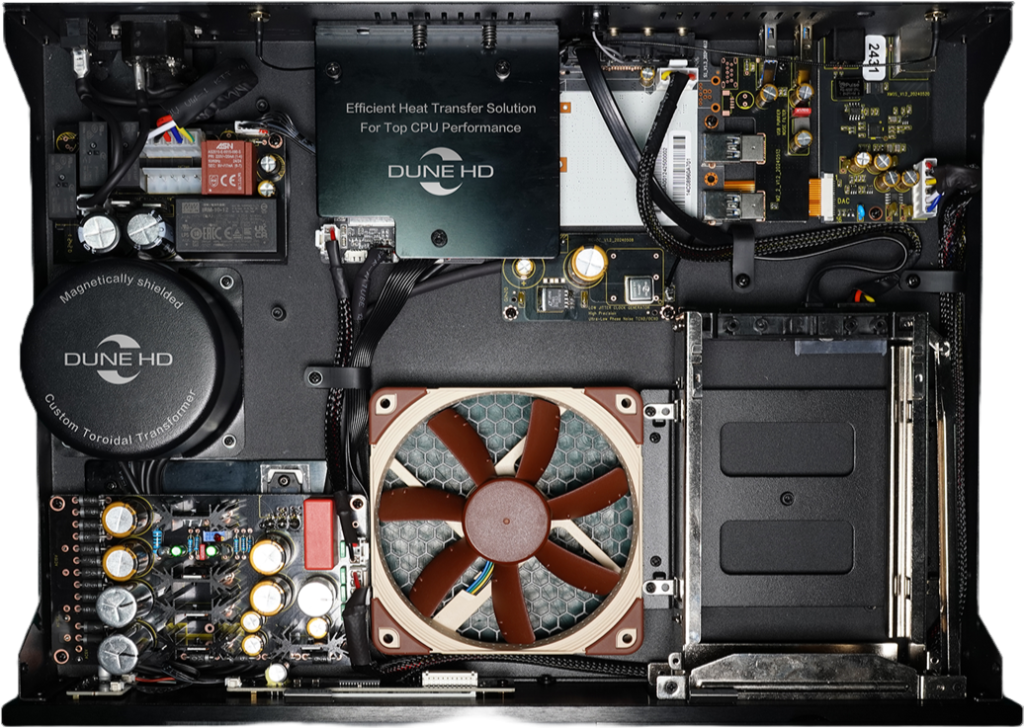
Audio Concept and Philosophy
I think by this stage it becomes clear what the main “feature” of the Max 8K is. As I mentioned in the introduction, different models have different concepts. Here I want to emphasize that the Max 8K is not a replacement for the Max Vision 4K, at least in terms of audio. It is rather a conceptual continuation of the Max 4K (Realtek RTD1295) philosophy.
The Max Vision focused primarily on analog audio output without using an external DAC. Its strength was that you could get high-quality stereo sound without any other devices. For example, I connected my Max Vision via its Hi-Fi RCA outputs to the analog input of my receiver (Sony STR-DN1080), which then fed two passive Polk Audio T50 speakers. The setup wasn’t audiophile-level, yet I preferred this sound over HDMI or regular analog outputs, all thanks to the built-in AK4493 DAC. However, this scenario worked mainly for audio; for video playback—even IPTV—analog output caused occasional dropouts, so I switched to HDMI for video and back to Hi-Fi outputs for audio. The player had a single Mode button to switch, but I still had to change inputs on my receiver, which quickly became annoying. Eventually, I used Max Vision 4K exclusively for audio and Solo 8K for video.
The Max 8K has a different philosophy. It is primarily focused on high-quality digital audio output. Everything is designed to deliver a clean signal without noise or distortion. That’s why it has a linear power supply and a precise clock generator. Analog output is possible and improved compared to Solo 8K due to custom clocks and improved power design (separate LDOs), but the main focus is digital output. There are two main digital options: USB Audio via a dedicated gold-plated port with extra interference protection, or a Hi-Fi coaxial output based on the XMOS XU208 chip, which is effectively a form of USB Audio.
So, Max 8K is not a direct replacement for Max Vision 4K. Video-wise, yes, but audio-wise, it’s a step in a different direction. Max Vision emphasized high-quality analog stereo via its built-in DAC. Max 8K emphasizes clean digital output for external DACs or direct connection to a receiver. This scenario is much more promising when approached properly.
USB Audio was possible on Max Vision, but aside from the linear PSU, there were no additional improvements. Bitperfect output via USB wasn’t available, so the main use case remained the internal DAC. With Max 8K, the scenario is fully realized: it delivers a perfectly timed digital stream, ready for any DAC or receiver. Essentially, Max 8K is a top-tier digital transport, and we’ll explore the practical implications later.
For audiophiles, this is exciting. Cinephiles might think they’ve wandered off-topic, but HDMI for audio and video still works perfectly. You’ll get excellent video and audio output. Max 8K is equally suited for video and audio; the discussion around audio is simply more extensive due to its Hi-Fi features. The XMOS chip is stereo-only, but the combination of TCXO and linear power supply reduces jitter and noise, which also benefits video quality.
Regarding the vibration-isolated HDD compartment, this is the first time I’ve encountered such a solution. In Max Vision 4K or Solo 8K, the slots are standard. Here, the drive is firmly mounted on rubber shock absorbers, which reduces resonance from the spinning disk. Paired with the quiet Noctua fan, this works excellently. Hopefully, Dune will continue using this solution.
This brings us back to the opening statement: Dune concentrated all their best current technologies in this model. Imagine Solo 8K, my previous main player, but enhanced: premium case, vibration-isolated HDD, linear PSU, custom clocks, and XMOS-based digital outputs. That’s the new Max 8K. It’s a high-quality, balanced player, but remember—it’s still part of a larger setup.
Network Modules
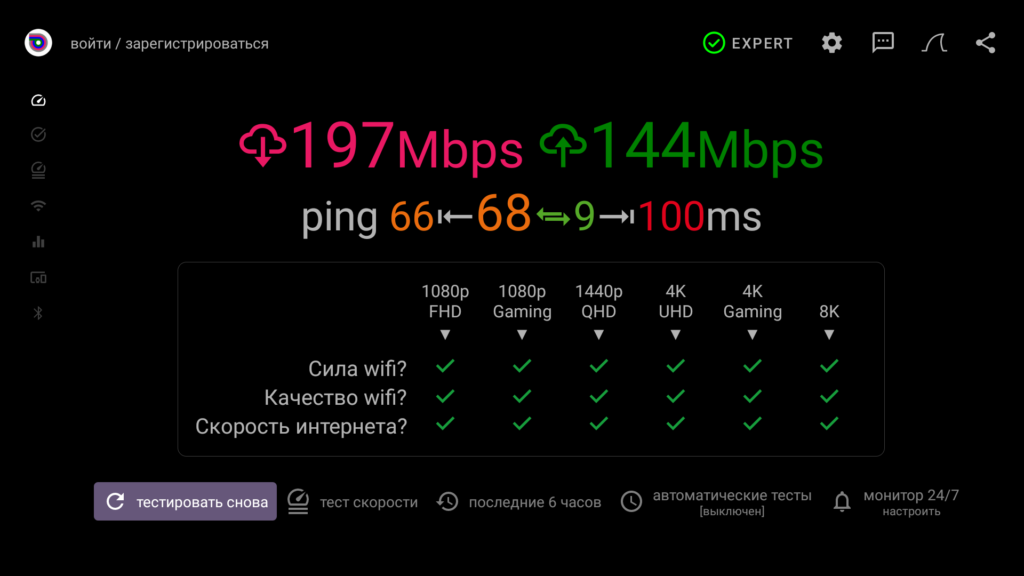
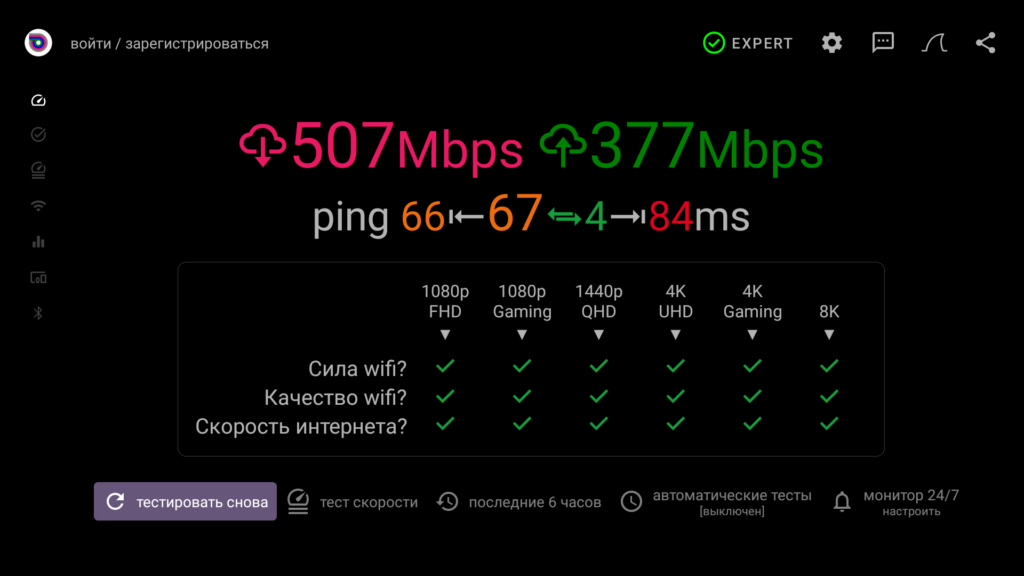
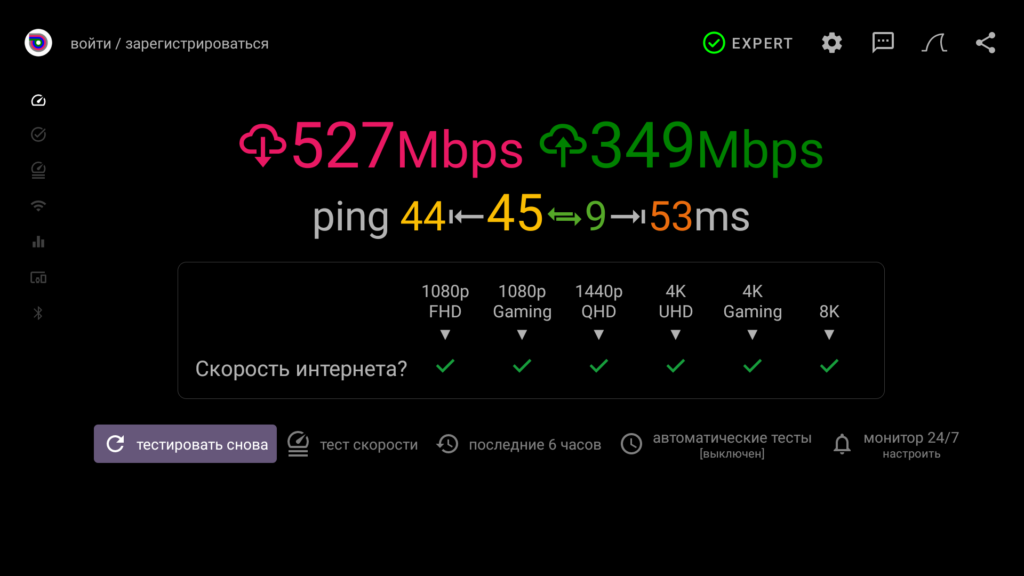
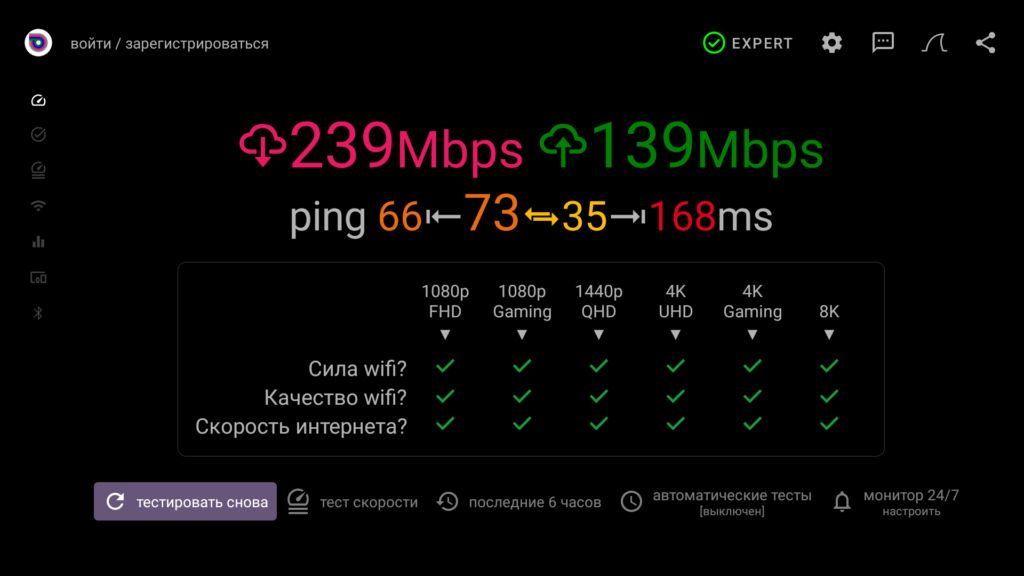
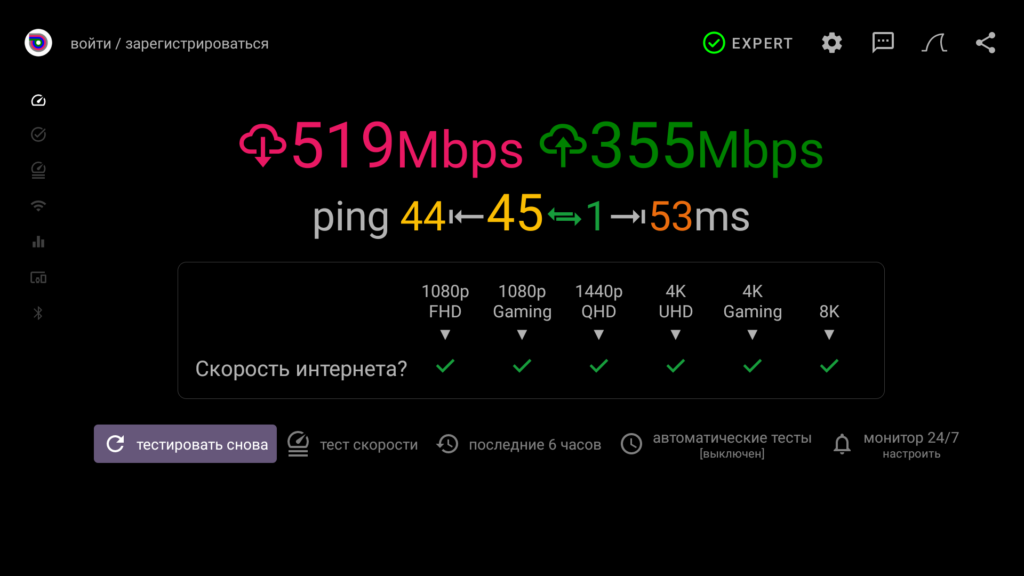
Max 8K features a 1 Gbit LAN and dual-band 2T2R Wi-Fi, including Wi-Fi 6. My router is a Keenetic Giga KN-1011, the player is about one meter away with no walls in between. Internet speed from my provider is 500 Mbps.
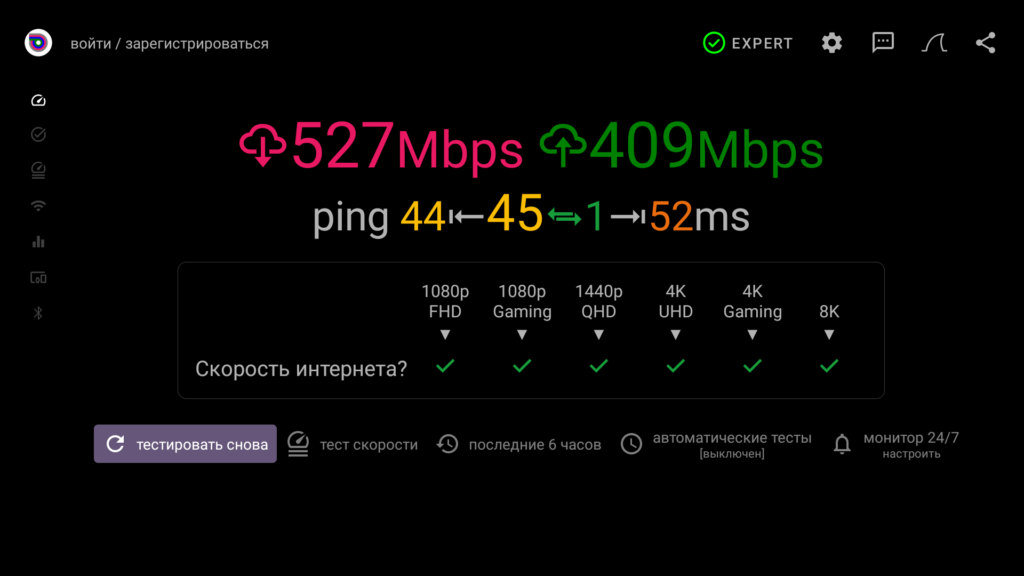
Network Performance
I’ve never seen such numbers on 2.4 GHz Wi-Fi before; I’m not sure what exactly causes this. But it is indeed the 2.4 GHz band, as I deliberately separated the access points in the router settings.
Using 5 GHz Wi-Fi (Wi-Fi 6 range) also delivers expectedly good results. Ethernet is a full gigabit connection (of course), with no issues. The included antennas are quite large, and after testing, I removed them—wired connection remains the best option. However, Wi-Fi performance is still very solid, just keep in mind room size, walls, and other environmental factors.
Video Playback
Dune HD Max 8K supports playback of all video formats, containers, and codecs. The only potential issues might arise with VC-1, which Amlogic chips traditionally handle less smoothly. Thanks to the powerful Amlogic S928X processor, even exotic 1080p H.265 10-bit anime videos play without problems. The only minor inconvenience is that subtitles and audio tracks are often stored in separate folders. For the player to recognize them, you need to copy them directly next to the video files. Packaging everything into an MKV container is not always possible, apparently the “samurai’s way” of Japanese animation fans.
Given the serious hardware, the audience will certainly appreciate the excellent Blu-ray menu navigation. ISO and BDAV containers are fully supported. Favorite concerts and movies can be enjoyed in maximum quality while retaining comfortable menu navigation. One note: active internet connection is required for menu playback.
DVD Playback
The same can be said for DVD-video. If potential Max 8K buyers ask why this format is still relevant, my answer is simple: for concerts! Unfortunately, not everything has been re-released on Blu-ray. Many iconic concerts are available only on DVD, often with good audio quality. Max 8K handles this without any problems.
When playing a DVD-video, the player will ask whether to play with or without the menu. I recommend using the menu, as the navigation is now extremely comfortable and works just as seamlessly as playback without the menu.
The way DVD and Blu-ray playback is launched can still be configured in the “File Browser” section. I usually set it so that playlists are created using the Enter and Play buttons. For internal storage, I prefer displaying the contents of the Dune HD folder directly, rather than the standard Android file structure.
For DVDs, as mentioned earlier, I always play them with the menu enabled. For Blu-ray, I leave the setting on “ask,” since I usually play movies without the menu, unlike concerts. This way, the player prompts me before playback to choose how I want to play the content.
In the video settings, you can enable auto-framerate and auto-resolution. However, the player upscales content very well on its own—better than most TVs, I would say. Therefore, I recommend leaving auto-resolution disabled, and decide for yourself otherwise. In the “Image Quality” section, you can enable AI features and the so-called sharpness filter. In my opinion, it’s better to leave everything off, as these features don’t improve the image quality.
Pay attention to the “Video Settings” section. I strongly recommend not changing anything here, except perhaps the “Preferred Color Depth” parameter. I have it set to “Maximum,” but you can choose “As in content” if you prefer. With my settings (maximum color depth), SDR content is displayed in 10-bit rather than 8-bit according to the content. The purpose of this setup is to minimize video mode switching when watching IPTV services. Notice my current video mode: 4K 2160p 50Hz [10 bit 4:2:0]. Auto-resolution is disabled. Auto-framerate is set to “All frequencies, prefer doubled.” This ensures that any live channel starts without switching the video mode, and thus without a black screen. If I had set “Preferred Color Depth” to “As in content,” the video mode would switch to 2160p 50 8bit 4:2:0, which I want to avoid.
In the same video settings, you can enable HDMI CEC. If you are using an AV receiver, I recommend enabling AVR Control. This option allows volume control through your receiver. If you don’t have a receiver, leave this setting off, otherwise the player won’t control the volume.
Equally important for content playback are the “HDR and Dolby Vision Settings.” If you do not have a projector or a TV with insufficient peak brightness, I recommend not using the VS10 engine.
This needs to be mentioned because it directly affects video playback.
The media player supports all image output standards: Dolby Vision, HDR10, and HDR10+. The most interesting for us is, of course, Dolby Vision. All profiles are supported across all containers. Profile 7 FEL is also supported, but don’t expect miracles — only one layer is decoded, while RPU data is taken from the second. How critical this is, I cannot judge, but I have watched various releases, and they all run without any issues. There’s no need for Dune to create workarounds like converting to Profile 8. In other words, we simply play the original disc image. Not every player can handle this.
The preferred Dolby Vision output mode is STD-DV (TV-led), fully implemented here with complete STD-DV support including CMv4.0. I can say that if your TV shows Dolby Vision content brighter than the media player, it means you haven’t configured the HDMI preset correctly on the TV port connected to the player. There should be no difference. Enthusiasts have confirmed this through instrumental testing. If there are problems, adjust the TV settings; the player is receiving full information from the TV.
The perennial stumbling block remains the infamous BD3D.iso. Unfortunately, the player can only play such releases in 2D. Viewing in 3D is possible only with stereo pairs, which must be assembled by the output device; the player itself cannot do this.
I don’t see the point in going into more detail here. If you have questions, refer to the Solo 8K review — everything is essentially the same.
A nice bonus when playing video with the Max 8K is the presence of a precise, low-noise clock source (TCXO) combined with a linear power supply. This ensures a cleaner signal with minimal jitter and almost no interference. Whether this is useful in practice depends on the receiver, but the fact remains: the player outputs a cleaner signal, which positively affects image quality. It’s not the XMOS chip (which does nothing with HDMI), but the LPS and TCXO that matter.
One thing is certain: in terms of image quality, you get the best possible today. Dune’s developers made a major breakthrough by disabling Amlogic’s built-in sharpness filter and adding full TV-LED support, bringing the picture quality closer to what MTK Blu-ray players provided. Additionally, jitter and interference are further reduced.
Audio Output
As mentioned earlier, there are two main use scenarios for the player: either for movies or for music. Home setups are usually built around this. There will always be a compromise: multichannel is essential for video, while music is always stereo. Max 8K performs equally well in both scenarios. Let’s start by examining HDMI audio output, since this is of interest to most people.
As usual, there are two audio output options: PCM and Bitstream. The most universal option is PCM — decoding on the device side. In this case, it does not matter at all what formats your soundbar or receiver supports. If you are outputting sound directly to your TV speakers, this setting is mandatory.
With PCM enabled, all formats are decoded into multichannel PCM (up to 7.1), except stereo PCM, which is output as-is. In short, it’s simple: enable the setting and you get sound, stereo or multichannel — depending on the track. You don’t need to “Google” which sound formats your soundbar supports.
The second option is Bitstream, where the player outputs audio “as is.” Here, there are no limitations: all audio formats are supported, including HD: Dolby Digital, Dolby Digital+, DTS, DTS-HD MA, DTS-HD HR, DTS:X, TrueHD (+Atmos). Multichannel AAC in this mode is decoded into multichannel PCM. In other words, Dune takes care of everything; the audio will be output correctly. The only requirement is that your receiver or soundbar supports these formats. If not, you can still use Bitstream by disabling HD audio. Then all DTS formats will be output as DTS core, and TrueHD as multichannel PCM (up to 7.1).
There’s not much more to say about theatrical audio formats, so let’s move on to music formats. Again, no surprises here: all common formats are supported — MP3, APE, FLAC, SACD, DSD… Everything I tested played without issues. Playback occurs at the original sample rate, avoiding forced resampling to 48 kHz, which is common for most Android players (we’ll discuss resampling in more detail later). This is thanks to the “Original Sample Rate Output” setting, which is enabled by default. That is, tracks at 192/24 will be output as PCM 192 kHz, not 48 kHz. Your receiver or soundbar will reflect this.
However, keep in mind that even though the signal is output at the original sample rate without forced resampling, it still passes through the Android mixer. True Bitperfect playback is only possible via USB-Audio and its special case — the Hi-Fi coaxial output (strictly when using a Hi-Fi player). But more on that later. In any case, this is critical only for audiophiles. For those listening to music via HDMI, outputting sound at the original sample rate is more than enough, since it usually goes further to an AV receiver or soundbar. USB-Audio, on the other hand, offers a more “sophisticated” connection scheme and is naturally aimed at high-quality stereo. These scenarios target different audiences with different setups. The player is capable of satisfying both, but the usage scenarios are fundamentally different.
Moving on, many will be interested in Hi-Fi Coaxial — something missing in the Solo 8K and similar models. First, a bit of theory for those curious.
It’s important to separate the hardware and software parts. Hardware-wise, chipset outputs (HDMI, S/PDIF) are clocked together with the video processor. This is normal for video and audio playback. But for audio, it’s better to have a more precisely clocked stream, separate from the video processor. This is where the audio processor comes in, logically. In the Max 8K, this is the XMOS XU208. It effectively “rebuilds” the stream before sending it out. This output method is essentially a special case of USB-XMOS output in Android.
Now a few words on the software part. The challenge with such devices is that the Android OS is optimized primarily for video output. In other words, it’s a video player first, and audio is secondary. Video audio is mostly 48 kHz / 24-bit, which Android outputs “as is” by default. 96 kHz / 24-bit output requires multiple resampling, which is often considered the lesser evil. The main issue is that 90% of audio tracks are 44 kHz / 16-bit. Converting 44 kHz to 48 kHz is not an integer multiple, and converting 16-bit to 24-bit is also incorrect. This is why Android is generally not ideal for high-quality audio output — except in one case: output via USB-Audio with exclusive access to the XMOS chip.
Here, we should discuss the music players. More precisely, two players: the internal player and the internal Hi-Fi player.
It’s important to understand that, although they look and operate identically, these are two completely different players, running on separate engines. The internal player handles both video and audio and works through the standard Android output system. As mentioned earlier, in all Dune HD models with the Amlogic S928X, audio playback allows partially bypassing the Android output subsystem, avoiding forced conversion to 48 kHz / 24-bit or 96 kHz / 24-bit. This is handled by the “Output Original Frequency” setting. While this does not improve the hardware itself—the signal still passes through the Android mixer—it preserves the original sample rate and bit depth at the software level.
The internal Hi-Fi player is a different story. It handles only audio, so you won’t see it in the “Video File Player” section, and it is designed exclusively for USB-XMOS output. With it, output via the Hi-Fi coaxial port or USB Audio achieves true bitperfect playback: all frequencies, 16- and 24-bit (32-bit outputs as 24-bit). When outputting sound via chipset outputs (HDMI, SPDIF), bitperfect is only possible for 48/16 (note that CD audio is 44/16), while 48/24 and 48/32 are output as 48/16.
To clarify again: we are talking strictly about stereo sound. The XMOS audio processor is designed exclusively for stereo, so it does not affect cinematic audio. You still get full bitstream for all movie formats. The presence or absence of the XMOS chip does not influence multichannel output, unlike the linear power supply and TCXO clocks (temperature-compensated crystal oscillators that define the frequencies for all output streams), which are significantly better than what is typically used in similar players. These components positively impact both audio and video output.
An interesting detail: you can switch between players on the fly without going into the general settings, acting “as needed.” The developers implemented this scenario: just hover over a file, press the Pop Up Menu button, and select the player for playback. This works for both audio and video (although, as noted, the Hi-Fi player is not available for video).
Returning to Hi-Fi Coaxial: output to the internal XMOS and then physically to the Hi-Fi Coaxial is essentially a special case of USB-Audio. The difference between Hi-Fi Coaxial and USB output is that with Hi-Fi Coaxial, the signal goes to the XMOS XU208 inside the Max 8K, while with USB, it goes to an external XMOS located in your DAC (if you don’t have one, USB-Audio will not make much difference). For Android itself, both paths are just USB Audio, as it doesn’t know whether the XMOS is internal or external. So, while both connections fall under USB Audio, the signal actually takes different routes depending on the output—either to the internal XMOS chip or to an external one. By the way, there’s a nice surprise with output to an external XMOS, but more on that later.
Sound Output Options
With the theory covered, let’s move to practical usage. For this review, I did a lot of reading to provide context, but personally, I’m mainly interested in listening to music. As mentioned earlier, my main music player was the Max Vision 4K with its built-in DAC AK4493 (lucky me, I got an early unit). My setup included the Max Vision, a Sony STR-DN1080 AV receiver, and two Polk Audio T50 speakers. I connected Max Vision to the receiver via RCA analog inputs. In this setup, the digital signal went through the internal XMOS to the internal Hi-Fi DAC, and I received high-quality stereo at the output.
Of course, the AV receiver is not ideal for this scenario, as it is primarily intended for multichannel (cinematic) audio. That is its main function. However, for my setup, it serves multiple purposes: it acts as an HDMI splitter, as all my devices (two Dune players, a PS4, and optionally a third device I’m testing) go through it. Additionally, it allows me to monitor which audio formats are being output: True HD, DTS-HD, DTS core, support for multichannel PCM decoding, etc. Without this, testing media players would be significantly more difficult. While I could get this information on forums like HDTV-Forum, nothing beats verifying it personally. For now, this compromise is necessary for my testing workflow.
HiFi Coaxial
So, the first thing I did after gaining access to the Max 8K was output audio via the Hi-Fi coaxial output (I always emphasize Hi-Fi because, as you’ve already seen in the pictures above, the player also has a chipset coaxial output, which I’m not particularly interested in). That is, I connected the Max 8K directly to the receiver’s digital input via a coaxial cable (I set the input settings on the receiver to Coaxial). It was a purely digital signal. And on the Dune itself, I enabled the Hi-Fi output. Incidentally, you don’t have to do this through the settings; simply press the Mode button on the included remote control. This button toggles the Hi-Fi outputs (Coaxial and I2S-E) on and off. So, when I enable the Hi-Fi audio outputs, the sound comes through them; when I disable them, the sound comes through the chipset outputs, in my case, HDMI. And so, “behind the scenes,” I switch the receiver’s inputs from auto to coaxial and back again to get HDMI audio again. Why would I even need to switch like that? Well, it should be obvious after the tutorial above: essentially, you’re choosing between stereo or multichannel audio. This is the so-called hybrid mode, and in my opinion, it’s the most convenient and flexible use case.
By default, the player’s settings select the internal player (HiFi) for Hi-Fi outputs. This is correct; in fact, that’s what it’s for.
So, speaking of sound, with this connection, it was quite good. Clean and detailed. However, it’s worth noting that in this mode, my receiver was running at near-max volume—well, roughly 60 out of the maximum 73 (and often higher), and yet it still lacked some punch. Compared to the HDMI output, you’ll notice there’s punch and drive, but the sound is less detailed and muddier. Some tracks even sounded muddy. HDMI is still good for theater sound and music listening, so to speak, without any pretensions (at least not in terms of high-quality stereo). But I had some, even within my setup. It’s not for nothing that I described my Max Vision 4K usage scenario to you.
Accordingly, I compared the sound of the Max Vision (via its built-in Hi-Fi DAC), the Max 8K via HDMI, and the Hi-Fi Coaxial connection. While I liked the sound of the Max 8K via Hi-Fi Coaxial more than the HDMI connection (even despite the obvious lack of a proper amplifier), and while the sound was ultimately cleaner, it certainly couldn’t compete with the Max Vision. But that was clear from the start. Comparing the two, the Hi-Fi Coaxial sound is cleaner and more detailed, but very neutral. On the Max Vision 4K with its AK4493 DAC, the sound was more lively and emotional, but it didn’t collapse into a mush like it did with HDMI. But, again, I was prepared for this and had no illusions.
If you’re interested in measurements and graphs, unfortunately, I don’t understand much about them. Fortunately, there are far more technically savvy people out there. All the measurements have already been taken on the HDTV forum . And these are compared to a Dune HD Duo 4K connected to an external ESS9018K2M DAC.
This brings us back to the “concepts” we touched on earlier. The point is that the Max 8K is primarily an audio transport. This means, unlike the Max Vision, if you want to get the most out of it, you need to integrate it into your setup. The Max Vision has a built-in AK4493 DAC (in my case, again, I was lucky), which I like. The Max 8K, on the other hand, has all the features for high-quality signal output, but it doesn’t have a DAC (we’re not counting the built-in one here; we’re talking about a Hi-Fi DAC). So, what’s the takeaway? You need an external DAC!
HiFi Coaxial + External DAC (AK4493)
Having reached these obvious conclusions, I realized this was a great option for me, and I purchased a DAC based on my beloved AK4493. After all, why not? Wouldn’t it be interesting to compare the Max Vision 4K with its built-in AK4493 DAC with the Max 8K, also using an external AK4493? Besides, this opened up the option of using USB Audio, as I wanted to test that as well.
Imagine my surprise when, after connecting the Max 8K to an external DAC, I heard a sound level I’d never heard before! My simple setup had never performed like this before. I understand this is a personal opinion, but I still wanted to share my experience with you; perhaps it might be of interest to someone.
The connection was as follows: I connected the Hi-Fi Coaxial digital output to the coaxial input on my DAC using a corresponding cable. Next, I connected the DAC’s analog outputs to the analog input on my receiver using a 2-RCA cable. On the receiver itself, I changed the previously installed Coaxial input to an analog one. Naturally, I enabled the Hi-Fi digital outputs on the Max 8K (remember, the Mode button ). With this connection, the signal goes through the XMOS XU208 Max 8K and arrives clocked to the DAC, which no longer uses its XMOS, but simply converts the digital signal to analog and sends it to the input of my AV receiver.
After doing all this, I discovered that my setup sounded great. Damn it, it sounded great! I was preparing for lengthy, ambiguous comparisons with the Max Vision, where subjective perception would take center stage. But in reality, half an hour was enough! Of course, I stretched this process out to almost a week, but it changed nothing. On the Max 8K through an external DAC, the sound was simultaneously clear and, at the same time, alive. And while Metallica and Helloween sounded a bit muddy on the Max Vision 4K (yes, yes, I understand, an AV receiver, far from the most expensive speakers, and so on, but give me the right to personal experience), the Max 8K through Hi-Fi Coaxial and an external DAC produced a completely different sound. You didn’t even need to listen closely: everything was clear almost immediately. I simply didn’t expect such a difference. At that moment, the Max 8K, in addition to being my primary device for video, also became my primary device for audio. And the Max Vision 4K had to make room. I swapped it for a more compact Real Vision 4K Duo (luckily I had one on hand), which now serves as a kind of backup player with some NAS functions: it contains disks that are accessible over the network 24/7, and it also downloads new movies and music for me.
Now let’s move from subjective perception to very specific numbers.
Take a look at the photo above. Look at the Info section. Playback is through the internal Hi-Fi player. In the lower right corner, you can see my DAC’s screen; it shows the bit rate being processed. Uncompressed formats are output as is (in my case, 44 kHz, 24-bit). DSD formats are currently transcoded to PCM 88.2, but the developers promise native output in the future.
If you select a standard internal player for playback, you’ll expect all audio formats to be output at 96/24. Cinema sound (directly during video playback) is naturally output in exactly the same way.
Speaking of audio in videos, the Max Vision 4K would occasionally drop out on a heavy multichannel setup, and that happened regularly (when using its analog Hi-Fi output). That’s why I’ve been using it exclusively for music lately. The Max 8K has no such issues. High-quality stereo sound in videos is crucial to me, especially for concerts. And I’ll tell you that, in my personal experience, with my very specific setup, when playing concerts, 96 kHz PCM audio through an external DAC is better than all those DTS, DTS-HD MA, and other DACs. Again, I have a stereo system. So, choosing between stereo and multichannel is irrelevant for me. And I prefer watching concerts with audio through an external DAC to HDMI. So, now I don’t have to switch between them at all; I just use it that way: everything is in stereo. The only thing is, I have to manually turn the DAC on and off every time, but that’s not a problem for me.
However, this is my particular case; your setup is likely different. Therefore, I can reiterate what I wrote earlier: outputting audio via the Hi-Fi coaxial output is the most convenient; it’s a true hybrid mode. Judge for yourself: you turn on the output, and the sound goes through it, delivering high-quality stereo. Disable the Hi-Fi output (and let me remind you that this is all done with just one press of the Mode button ), and the sound goes back through HDMI, allowing you to enjoy your True HD and other content. All this without any additional switching. You’ll still have to switch inputs on the receiver, though. USB audio output is a bit more complicated, as it has its own specifics, so I recommend using Hi-Fi Coaxial for a hybrid use case.
USB-Audio (outputting audio via USB to an external DAC)
Although Hi-Fi Coaxial and USB audio output are essentially the same for Android—they’re both USB audio—they’re actually two different paths. As you’ve already understood from what I wrote earlier, Hi-Fi Coaxial audio output uses the built-in XMOS chip. The digital signal is then sent to the DAC and converted to analog. When outputting audio via USB (to an external DAC), the signal also goes to the XMOS chip, but it’s sent to the DAC itself, which is external. These are two different paths.
Digging deeper, it turns out that USB audio output is considered the most “correct” option. In theory, of course. The point is that this method of audio output involves fewer conversions. As I mentioned in the paragraph above, the Hi-Fi Coaxial Max 8K uses a board with an XMOS XU208 inside. It converts the signal to SPDIF, then transmits it directly to the external DAC: its SPDIF receiver (in my case, an AK4118), which receives the signal, converts it, and then transmits it to the DAC chip. With USB output, however, the process is significantly simpler: the Max 8K directly outputs the signal “as is” via USB to the XMOS DAC chip, thereby bypassing the round-trip conversion to SPDIF.
I’ll briefly describe the connection process, although it’s quite obvious. So, I connect one end of a USB cable (Type A to Type B) to the USB Max 8K and the other end to the USB port of my DAC (mine is Type B). I connect the DAC itself to the analog input of my AV receiver via a 2-RCA cable. That’s basically it. Next, I simply switch the inputs on the receiver, changing from Auto (HDMI) to Analog. Just please don’t confuse inputs with outputs. Throughout the review, I specifically talk about changing the receiver’s inputs : initially, when connecting via the coaxial output directly to the receiver (without an external DAC), I set it to Coaxial. After connecting via the DAC, I switch it to Analog. If I need to switch back to HDMI, I’ll switch it back to Auto.
Here’s one important detail I need to mention. That pleasant surprise I mentioned above. After a recent software update, the Max 8K (like all other 8K Dune players, by the way) can now output audio without resampling via the Hi-Fi player not only to its own XMOS chips but also to external ones! This one feature changes everything. Were you looking for the key difference between the 8K players and the rest, including the previous generation based on the Realtek 1619DR? Here it is! Previously, this was only possible with UAPP (USB Audio Player Pro), which is quite difficult to obtain in the current difficult times for those living in the Russian Federation. Now that’s no longer a problem. All you need to do is choose a Hi-Fi player for your audio.
Pay attention to the screenshot above. The audio player is an internal player (Hi-Fi). This player will provide you with audio output without resampling. I’ll show this in screenshots a bit later. By the way, I wrote about hybrid mode and all that earlier. This is where the main inconvenience of working with USB audio lies, if you need to periodically switch to HDMI audio. You probably noticed the difference. Here, we’re setting a Hi-Fi player as the audio player. Which only supports stereo . This means that when you switch to HDMI, the audio will still go through the Hi-Fi player. Until you change it to internal in the settings. The downside of a Hi-Fi player is that when playing via HDMI, it will still output everything in 96 kHz PCM! Well, I mean, as I mentioned above, there’s a setting to output the original frequency. HDMI outputs audio without forced resampling to 48 kHz. This isn’t relevant when using a Hi-Fi player. You’ll get a 96 kHz output, and, as mentioned above, it’s stereo only. In short, you don’t need to enable the player when using HDMI. Use it only when outputting audio via USB. This is the main inconvenience. When switching to multichannel mode, so to speak, you’ll need to switch the player in the playback settings. Or you’ll have to select the player each time via the pop-up menu (the cursor on the file + the PopUp Menu button ), which, frankly, isn’t very convenient. This isn’t the same as simply disabling the Hi-Fi outputs with the Mode button and using the chipset outputs with the internal player, as is the case with HiFi Coaxial.
By the way, if, like me, your setup is designed for stereo, this isn’t so critical. 96 kHz resampling isn’t inherently bad, and stereo output in such a setup isn’t a problem. And if your DAC has a proper hardware power switch, everything will be quite smooth: turn it on and the audio will go through USB; turn it off and it will go through HDMI (again, don’t forget to change the inputs on the receiver behind the scenes; it’s essential). However, if the DAC doesn’t have a proper power switch, then yes, that’s a problem: switching to HDMI will be quite problematic, since you’ll have to unplug the DAC. Otherwise, the player will still think there’s an audio device connected via USB and will continue to output audio to it. True, in this case, the media player’s audio settings offer the option to completely disable Hi-Fi digital outputs and USB audio output, but you’re unlikely to want to use it often, as each time you turn it on/off, the player inevitably reboots. There’s no other way. Therefore, when choosing a DAC, look for the option to completely disable it at the hardware level.
In short, to avoid further confusion, I’ll restate my point. If you have a multichannel system, then for convenient switching between multichannel and stereo, it’s better to output audio via Hi-Fi Coaxial. It’s easier for you: press a button, switch the input on the receiver, and you’re done—hello, True HD, long time no see! Outputting audio via USB, however, will require more manipulation. This is a less convenient use case. If your setup is designed for stereo, then, by and large, it won’t matter whether you output audio via USB or Hi-Fi Coaxial. This is certainly true in terms of convenience, since you won’t need to switch to HDMI. So, why bother? So, use whichever connection you prefer for sound.
I’d like to emphasize one important point that newbies, including myself, might overlook. As I’ve written many times before, for Android, whether USB or Hi-Fi Coaxial is USB Audio. Therefore, avoid using USB ports during playback: don’t connect flash drives, hard drives, and so on. If you need to, first stop playback, connect the drive, and then restart playback. If you ignore this advice, you may experience incorrect player operation: tracks skip, audio drops, and so on. This isn’t a bug; you just need to understand the process. You don’t choose which USB port will output audio. The device doesn’t care: audio is output through all ports at once. Therefore, avoid using these ports unnecessarily during playback. Only after stopping: stop the track, connect the flash drive, and then start the track. At the same time, your connected USB drives will naturally continue to work as they did before.
As I mentioned above, any USB port can be used for USB audio output. However, for this particular case, Dune HD engineers have prepared for us a “golden” USB port. Okay, gold-plated, sorry, I couldn’t resist! We’re talking about the very same USB port with additional filtering. It’s located next to the Hi-Fi Coaxial port.
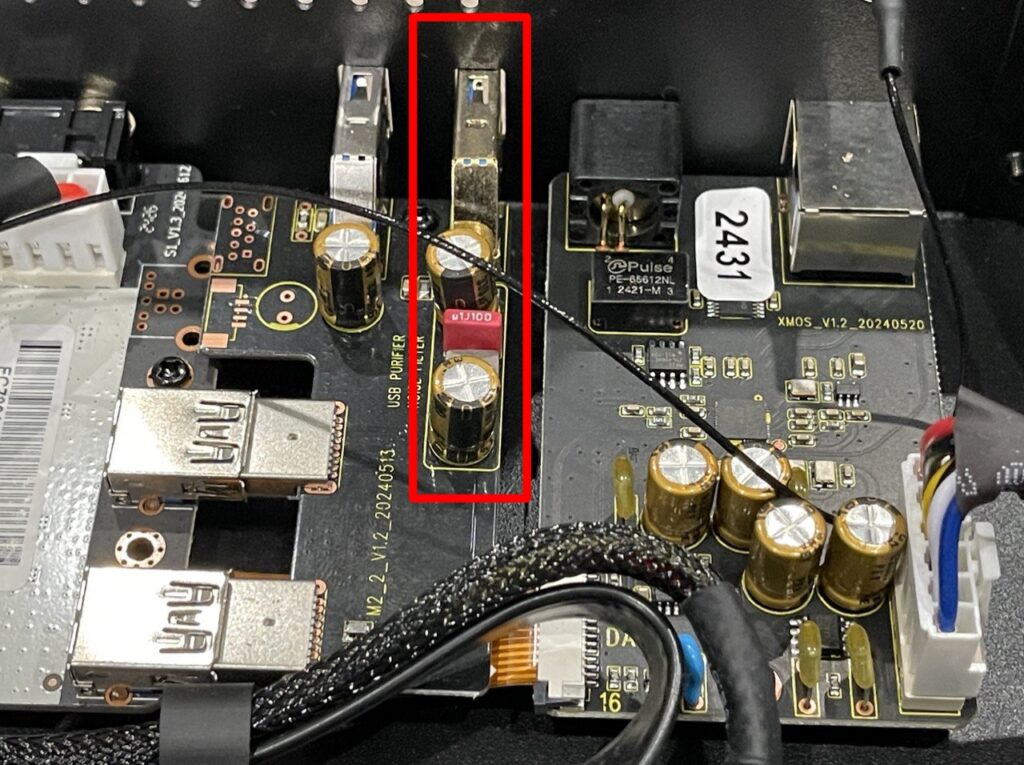
By the way, if you’re not particularly interested in USB audio output, this port can be used as a regular USB port. For example, you could connect an external drive, thereby showing it the utmost respect. As the saying goes, “All the best for drives,” or something like that.
USB audio output, as you may have already guessed, is no different from Hi-Fi Coaxial, that is, when using a Hi-Fi player, DSD, SACD DSD formats are still transcoded to PCM 88.2 (until Dune releases firmware with native output), while other stereo formats are output as is.
If you use the internal player, all audio will be output at 96 kHz. The built-in player is always used for video, so if you watch videos with audio output via USB Audio, all theater formats will still be output at 96 kHz PCM. Does this make sense for video? If your home system is designed for stereo, then yes. The sound certainly won’t be any worse. If you have multichannel audio, you obviously don’t need this, except, in my opinion, for concerts, and even then, not always.
With my setup, when outputting audio to an external DAC, whether via Hi-Fi Coaxial or USB, the sound itself is much more engaging than via HDMI. I turned on Metallica’s “No Leaf Clover” (1999) and absolutely loved it. Your experience may vary depending on your setup and preferences, but for me, this point is pretty clear. As I mentioned, I have an external DAC, an AV receiver, and two floorstanding speakers, and through testing, I’ve determined that I prefer the sound via the DAC. The last time I switched to HDMI was to double-check the Bitstream output for this review, but once I finished that, I could easily watch my favorite concerts with the 96 kHz PCM output.
So, we’ve looked at three audio output options: HDMI (which is fairly straightforward: Bitstream for all formats, HD audio support, multichannel PCM up to 7.1, and so on), Hi-Fi Coaxial, and USB. The latter audio output options will delight fans of high-quality stereo. Naturally, an external DAC is the best choice. As for the sound quality itself, in my opinion, it’s incomparably better than HDMI audio, and significantly better than the built-in Hi-Fi DAC in the Max Vision 4K. Keep in mind that the benefit of an external DAC is that you can easily upgrade it to an even better one (except for the cost) (the key is to approach this issue wisely: more expensive doesn’t always mean better). During my testing, I used two different DACs, completely different in class, and the sound changed noticeably. And, again, all this is done in conditions of not the best quality acoustics and the use of an AV receiver (in my defense, I can say that I turn on Pure Direct on it).
But when I tried to compare the sound quality of outputting to an external DAC via Hi-Fi Coaxial and USB, it became a problem for me. Subjectively, the sound, if any, differed very little. At least with my setup. In fact, if you ask me which connection option is preferable, I can only say: try both. If you hear a difference, great. If not, use whichever option is most convenient for you. This all applies, of course, if your DAC has both Coaxial and USB.
If you’re still waiting for a direct recommendation from me, I’d still recommend the Hi-Fi Coaxial option, as it’s the most versatile and only available on Max 8K.
Well, on that note, I’d like to move on to the conclusion. I know this review turned out to be quite specific. I know I didn’t cover much: the traditional interface features, the network capabilities of the file explorer, and everything else that Dune HD media players are known for, but I didn’t want to stretch this text any further than it already is.
Conclusions
Well, I admit that I rate the Max 8K very highly. In my opinion, it’s absolutely the company’s best player, and deservedly so, so I’ll judge it with the utmost severity. I’ll also try to present the positive aspects for you in as much detail as possible. We have a Max, right? So let’s have the best!
Let’s start with the positives this time:
- High-quality full-size case with individually designed elements.
- Separate Bluetooth antenna: no need to attach two other (Wi-Fi antennas) if the media player is connected via LAN.
- 3.5″ hard drive bay on vibration-isolated chassis.
- Memory configuration 8/64.
- Supports WiFi 6 and 1000 Mbps Lan.
- File Explorer with built-in networking capabilities: SMB, NFS, UPnP. A separate SMB server is available.
- Support for Widevine L1 DRM encryption keys, which are necessary for streaming services (video services) to operate at the highest available quality.
- Displaying audio track tags when playing a movie ( not only the codec and language are displayed, but also the track’s author (for example, Red Head Sound), unless, of course, this is not a Blu-ray disc structure, but, say, a remux in a Matryoshka doll .)
- Support for all video standards (SDR, HDR10, HDR10+, Dolby Vision). All Dolby Vision profiles are supported, in all containers.
- VS10 engine support for HDR and SDR.
- Support for auto frame rate and auto screen resolution.
- Full STD DV with CMv4.0 support. Ability to disable the sharpness filter, which is enabled by default on all other players with the same chipset and negatively impacts image quality.
- Bitstream of all audio formats without any restrictions and support for multi-channel PCM.
- A music player that supports most audio formats and works correctly with .Cue files.
- Output of the original frequency without forced resampling to 48 kHz.
- Bitperfect for USB audio output. Dedicated USB with additional filtering and noise protection.
- The presence of a linear power supply and separate HiFi outputs based on XMOS (Coaxial and I2S-E).
- The presence of an ultra-precise and ultra-low-noise clock generator with temperature compensation (TCXO chip).
- A well-thought-out cooling system using a premium ultra-quiet Noctua cooler.
- Cataloger “My Collection”.
- Availability of the Dune Control mobile application (full IP control of your media player).
- The proprietary Dune Shell interface with all its features and support for custom plugins.
Now let’s talk about the downsides:
- Lack of BD3D.ISO (3D.MVC) support. You can only watch stereo pairs, but they must be “assembled” by the display device (TV); there’s no other way.
- No Netflix certification, Google Cast not working.
- An active internet connection is required to use the Blu-ray menu. Online license verification is also required when playing Dolby Vision Profile 7.
- Unstable operation with the VC-1 codec (typical for all Amlogic devices).
- The inability to adjust the brightness of subtitles (while in regular subtitles, which are in .srt format, this can be “cured” by changing the color from white to gray, with PGS, which are always white, it’s a disaster).
- Lack of integration with any music streaming services.*
- The lack of native playlist creation in the music player. There’s no way to catalog your music collection: everything is managed solely through the file structure (manually, by folders) and pre-defined tags.
- The Dune Control mobile app does not display audio tags for movies and does not allow you to view information about the stream being played.
* By “integration,” we mean the lack of clients for music services. While for video, for example, there are pre-installed video service catalogs through which you can watch a particular film, there’s nothing similar for music.
As you can probably tell, I really like the Max 8K. It’s now my main player, and I think it will be for quite some time. The model is quite versatile and self-sufficient, although I suspect the average buyer will ask questions like, “Where’s the Hi-Fi DAC?” But there isn’t one. It’s not needed within this concept. As I said earlier, in terms of sound, it’s the transport. The source. This player’s goal is to deliver the purest, most unadulterated stream possible: bitperfect and minimal jitter, and it delivers on that 100%. Everything is in its place here. Without bitperfect, all the work on jitter reduction would be useless. As it is, we truly get a high-quality audio-video source. And then the external DAC and speakers decide. A built-in DAC would only affect the final price, but the overall sound would still be worse. Comparing it with the Max Vision 4K clearly demonstrated this. And if you already have a good DAC, why overpay for a built-in one you won’t use? Therefore, within this framework, I believe the Max 8K is a completely self-sufficient player. There’s absolutely nothing superfluous here. Everything is as strict and to the point as possible. You either get the maximum in terms of multichannel audio output, or you have the option for high-quality stereo output. Nothing to add or subtract. Moreover, in terms of connection, there are two ways to achieve high-quality stereo, and both are designed down to the last detail.
As for video, since this is still primarily a video player and a streamer secondarily, there are no problems at all. We get one of the best images available today (at the time of this review). The player also supports original Blu-ray discs, meaning they’re played at the highest quality. DVD-video playback is also supported.
Based on the 2024 results, Dune definitely gets a thumbs-up from me. They released a model that combines the very best of what’s available today. The player will find its place in absolutely any setup, and it’s up to you to fully utilize its strengths. In my case, that’s equal parts audio and video. And in stereo. That was all I was initially interested in. You can also integrate this player into a multichannel system and watch Atmos movies on a huge screen. The player won’t look modest in any scenario. Except, perhaps, for stereo output without an external DAC (the only question is, why?). Keep that in mind. The sound will still be good, but comparing it to output from a Hi-Fi DAC is pointless. As for my thoughts on the need for a separate Hi-Fi DAC in this particular device, I wrote a little higher.
Of course, there will be those who favor the ultimate approach of “let’s do everything at once, and we’ll figure it out ourselves!” And that’s certainly a valid option, I don’t disagree. But the Max line of players has never been like that. That’s more the case with the Ultra line. They have the “everything at once” approach, but the price has always been appropriate. The Max 8K, at 89,990 rubles at the time of writing, is a true masterpiece, stripped down to its bare essentials. It’s a true value, as they say. Yours truly reached “zen” with it. But only after I integrated it into my home system. Which, in fact, I wish for you too! Thank you for your attention!



4 comments
A Free User
I bought this media player after the Dune HD Max, which had faithfully served me for years since the day I purchased it. At the moment, my only complaint about this media player is the inability to slow down video playback, which my old model could do from 1/16 to 1/2 speed. I have often used slow-motion playback, going back to the VHS days.
A Free User
Today I bought this player—it’s simply amazing, no questions asked. Build, quality, capabilities—it’s all 150%. I switched to this new model after my old workhorse, the Dune HD Max, which had faithfully served me all these years.
xGREGORYx
This model has no competitors because there is no Bitperfect over USB—at least in the stock player. As a sound transport, it is probably the absolute best option among media players.
As for Plex, of course, you can’t set up a server. But the client can be installed on its own, just like on a smartphone or tablet. In any case, I don’t see a single reason to buy a Dune just to use it with Plex. Dune should be purchased for its software and capabilities.
SergeySer
I myself have a Max Vision 4K on ESS. Previously, the built-in DAC was also sufficient, but as soon as I tried an external DAC like the Fiio K9 Pro or HiFiMAN Serenade, they outperformed the DUNE. However, they cost about the same as the DUNE itself. If we rate them in points: HiFiMAN – 10, Fiio – 9, DUNE – 7.5, then going back to the DUNE was no longer appealing.
Still, credit to Dune for releasing the Max 8K, which has a USB port for connecting an external DAC, but it has no streaming functionality. This again follows the concept of downloaded files; there’s a need for a proper client for TIDAL, Qobuz, Roon, our ZVUK, and music radio stations. Don’t say it’s difficult—creating a proper DAC is difficult. If you want to evolve, you need to make a real streamer like “Aurender.” I may be exaggerating, but I repeat: TIDAL, Qobuz, Roon should work in a way that allows the client to fully control the DAC via USB. Otherwise, it’s a stillborn device. If you are entering HI-FI, go all the way—otherwise, an audiophile doesn’t care about your USB.
Why I’m not concerned about online video services: because none of them stream Blu-ray quality; everything is compressed, video and even more so audio. If you want to watch a movie in maximum quality, you need the file. Online music services, on the other hand, offer maximum sound quality—I’m not even talking about DSD and other formats.
So this “royal” USB is not needed by me, and others won’t appreciate it either. It’s useful only for a narrow group of people who store everything as files and don’t want to keep switching DACs. And the only reason I want to buy it is for the video.