
Sat-Integral S-1412 HD Rocket Review
In the fall of 2018, the Sat-Integral team delighted the satellite receiver market with two new products: the Sat-Integral S-1311 HD Combo, a combined satellite and terrestrial receiver, and a new version of the popular Sat-Integral S-1412 HD Rocket. Today, we’ll introduce you to the latter.
Also worth considering a combination model, which is slightly simpler in functionality and hardware, but also has the ability to receive DVB-T2 channels. However, if you have a relatively new TV that comes with a DVB-T2 tuner, we recommend this model.
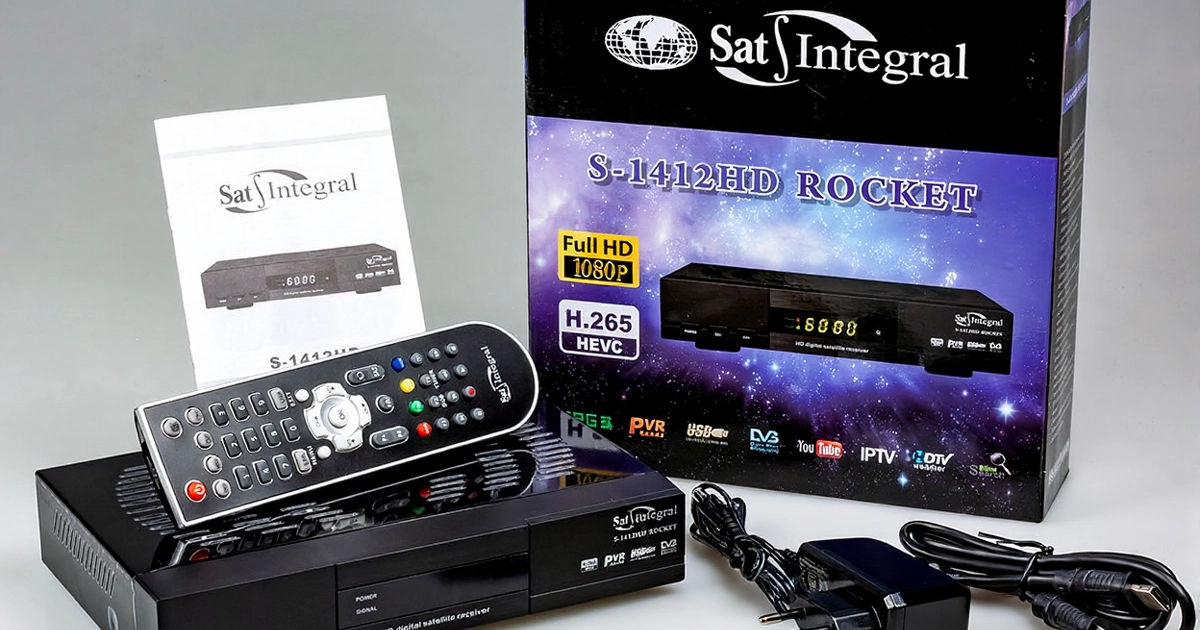
The Sat-Integral S-1412 HD Rocket receiver, despite its potential, belongs to the budget segment. Unlike its predecessor, the Sat-Integral S-1223 HD Rocket, which used the Ali3511 chip, this model uses the GUOXIN GX6621 processor with support for the H.265/HEVC codec.
The packaging box features the same familiar receiver design against a starry sky. The front panel of the receiver is shown in operation. Unfortunately, there is no remote control or rear panel. The H.265/HEVC codec logo is next to the Full HD icon. A brief list of technical specifications and features is on the sides of the packaging, available in Russian and English.
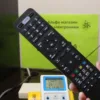
Although all recent Sat-Integral receiver models have used a new configuration, the Sat-Integral S-1412 HD Rocket’s remote control, like the case, remains unchanged. This configuration is quite convenient and functional, so there’s no reason to change anything. Furthermore, those who already own Sat-Integral receivers can theoretically use remotes from older models.
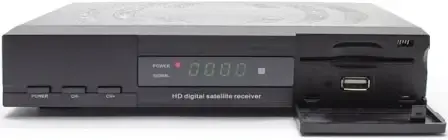
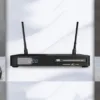
The receiver’s body retains the clean, streamlined design of its predecessors. The front panel is made of matte, smudge-resistant plastic. A four-character LED display with adjustable backlight brightness is located in the center of the panel. To the left are the power button and two channel buttons. To the right of the display is a hinged flap that conceals a USB port for connecting various devices. A second USB port is located on the rear panel for those who need more than just one port.
A receiver power indicator and a green signal strength indicator are to the left of the display.
Sat-Integral S-1412 HD Rocket Features:
- Modern GX6621 processor with H.265/HEVC codec support
- Flash 128 Mbits (16 MB)
- RAM 2048 Mbits (256 MB)
- Metal case 220x40x145 mm
- RJ-45 Ethernet connector with support for network functions and applications
- 2 x USB 2.0 ports with support for WiFi/3G/4G adapters
- Fast channel switching
- Simultaneous recording and playback (second) of programs
- Support for many media formats
- FAT, FAT32 and NTFS formats of USB drive or USB-HDD are supported
- Excellent picture quality with HDMI output
- Output resolution: 480i, 480p, 576i, 576p, 720p_50Hz, 720p_60Hz, 1080i_50Hz, 1080i_60Hz, 1080P_24Hz, 1080P_25Hz, 1080P_50Hz, 1080P_60Hz
- RS-232 port for additional functions
- Full support of DVB-S/DVB-S2 (MPEG-2/ MPEG-4/ H.264/ H.265(HEVC))
- SCPC & MCPC reception from Ku/C band satellites
- Control with DiSEqC 1.0/1.1/1.2/1.3 (USALS), Auto DiSEqC
- “Blind” search
- Multi-satellite, network, manual search.
- Memory: 100 satellites and 8000 channels
- 8 favorite groups
- Parental control
- Multilingual menu support
- Sorting channels by numerous parameters.
- Convenient functions Group channel movement, return history (RECALL)
- Dual-mode 7-day program guide (EPG)
- Software update via USB / RS232.
Network functions of the Sat-Integral S-1412 HD Rocket receiver:
- Network connection support (wired, WiFi, 3G)
- Remote control of the receiver (Android remote control)
- Video broadcasting to network devices with Android OS
- DLNA
- Watching IPTV
- Watching Youtube, Megogo
- Online radio
- Google Maps
- Viewing the weather forecast
- Reading RSS news
- Ability to connect to FTP servers
Sat-Integral S-1412 HD Rocket connectors:
- CA – universal card reader UNICAM
- LNB IN – satellite dish input
- LOOP OUT – satellite dish loop output
- LAN – interface for connecting to a local network or the Internet
- 2 x USB 2.0 – connecting external USB drives, WiFi/3G/4G adapters
- HDMI – digital HD video/audio output
- AV output – analog TV connection
- COAXIAL – digital coaxial audio output
- RS 232 – connection to a computer COM port
- 12V power adapter socket
The Sat-Integral S-1412 HD Rocket package includes:
- User manual,
- HDMI cable,
- Remote control,
- Batteries
- , Power supply.
The receiver ships with the basic firmware version 1.0, but at the time of writing, version 1.11 was already available. The manufacturer recommends updating the receiver with this firmware immediately, as it contains approximately 40 changes compared to the basic version.
You can download this and subsequent versions from our forum.
To update the firmware:
- Unzip the archive to the root of the USB drive.
- Connect the USB drive to one of the receiver’s ports.
- Press the USB button on the receiver’s remote control.
- Locate the firmware file and press “OK.”
- Accept the update.
- The receiver will automatically update and reboot.
You can also update the keys or channel list.
After the update, the receiver is fully operational.
To begin using the receiver’s internet features, you’ll need to select your network connection type. With the Sat-Integral S-1412 HD Rocket, you can use a wired network by connecting an Ethernet cable, use Wi-Fi by connecting a USB Wi-Fi adapter to one of the ports, or use a 3G modem.
Supported Wi-Fi adapter chips are displayed directly in the receiver’s menu: Menu > System Setup > Receiver Information
A list of supported 3G modems can be found on the forum.
We had no problems with the Huawei E352b 3G modem with Kyivstar.
Initial antenna setup is virtually identical to that of most receivers.
When configured correctly, you’ll see the signal level and quality.
One of the receiver’s new menu features large antenna installation indicators, accessible via the blue “Zoom Signal” button.
You can scan an entire satellite or individual transponders. To scan NTV Plus, simply select any working transponder from that provider and select “Network Search” when starting the scan.
Once the scan is complete, the receiver now displays a summary table with information about what was scanned. This table is also useful for blind scanning.
The receiver’s OSD menu has some similarities with the previous model, but has actually completely changed its appearance.
Information is also available on the image resolution, aspect ratio of the received signal, channel name and sequence number in the list, availability of EPG, multichannel audio track, current and next program titles with a progress bar, signal strength and quality, date and time.
Pressing the INFO button on the receiver’s remote control again displays detailed EPG information for the current program.
To see a large indicator of the current transponder’s signal level and quality, press the INFO button a third time.
Let’s take a closer look at how to connect the receiver to a local network.
If the adapter was selected correctly, with a supported MT7601 or RT5370 chip, you should see this display when you connect it to the receiver’s USB port.
The settings must be made in Menu – Network
Select your network from the list and connect to it.
To ensure that the settings are correct, you need to check the data in the IP Parameters.
The Receiver must receive an IP address, Gateway and at least one DNS1.
For those who don’t want to check the ping from their home computer to the receiver, the developers have created a Connection Test feature.
If the network is successfully connected, you’ll receive a message by clicking the yellow button.
Don’t forget that if something goes wrong, don’t immediately blame the receiver.
For example , suppose you have two identical Wi-Fi adapters, but they show different results when connected to the same receiver.
The problem lies with the USB Wi-Fi stick. The two dongles appear identical, but one has a problem.
Once the 3G modem is connected and configured correctly, you’ll need to wait about a minute for it to connect to the mobile network. Naturally, this depends on your connection region, operator, and coverage quality.
In this case, we’re using a 3G SIM card.
You can also go to your IP settings to test the connection. The exception is that you won’t see any data in the list, and the green button will be labeled “Test Link.” However, the test is performed identically; if successful, you’ll receive a response indicating a connection to the www.google.com server.
We’ll be testing the receiver’s network capabilities using a cable connection.
Menu – Network Applications
Quite an impressive list
YouTube is currently working. As far as I can tell, the app is now controlled by loading a special configuration file from USB or the network, which makes changes to the app’s functionality.
You can set the video region, change the video resolution, use categories, and search.
We’ve noticed that some videos may not play, but this also happens on other receivers and media players.
The Megogo app works perfectly. Posters and titles are displayed. Videos play, and you can rewind and pause. It will likely be further improved.
In addition to these apps, you can watch IPTV channels, with two separate apps for this.
There’s also internet radio with a wide selection of stations.
The built-in DLNA DMR function can run not only at startup but also in the background. You can stream music, videos, or photos to your TV screen via a satellite receiver while sitting on the couch. Your phone or tablet must be able to stream content and be on the same local network as the receiver.
Weather, I used Stalker portals, an RSS reader, a VFTP client, VOD, the Apollo service, the MyTube app, and XTREAM.
You can find preinstalled playlists with Ukrainian channels, which will soon be moving to IPTV.
Online key and configuration updates are also available. Receiver software may also be updated.
Users can also use the mobile app, which can be downloaded by scanning the QR code in Menu – Network Applications – Mobile Application.
The receiver ships with basic software, which hasn’t been fully tested. Updates to improve features and bugs are expected based on user feedback. Sat-Integral listens to its customers and implements improvements in future software versions and new receiver models.
It supports HEVC. The receiver doesn’t support Ultra HD channels, but it can watch HDRips downloaded from the internet. The receiver handles them without any issues.
The result is a decent receiver, a completely reliable and more reasonably priced replacement. Undoubtedly, there may be some issues with internet applications at first, which will be resolved soon on the forum. The receiver itself operates quite well, as does channel switching. It has a built-in UNICAM card reader, which currently works with Xtra TV. But judging by the latest news, receivers with card readers will be a thing of the past within a year. The receiver runs completely cool, likely due to its external power supply and cool processor. It’s also worth noting that compared to its predecessor, the Sat-Integral S-1412 HD Rocket has twice the RAM and flash memory, and consumes 50% less power, which is quite significant these days.
Pros:
- Ethernet port available;
- DLNA DMR functionality;
- Decent set of network applications;
- Phone application;
- External power supply;
Cons: - I would like to see the weather in the receiver’s OSD;
- I would like to have more sorting options in the channel menu


4 comments
Andrzej
I tried IPTV — at first I spent a bit of time playing with the settings since I hadn’t used it before, but in the end everything turned out to be extremely simple. I’ve been using it for a month now, I like everything, and I’m getting the same one for my sister.
Guest
This one has a slightly better processor and supports H.265. It also has LAN.
Beilo
The Sat-Integral S-1412 HD Rocket tuner is convenient to use and has simple settings. I ordered it from sat-integral.eu It was delivered on time and well packaged. I recommend it.
Art
Much better than the currently popular 1268. It works faster, the menu is better, and the picture is sharper. I connected it to the Internet via a 5370 3 dBi antenna — reception is good, YouTube works without glitches.